
App development cost and five-year operating costs
Development is just the tip of the iceberg. See what drives custom app pricing, what five years of operation and growth cost, and how to compare quotes.
Off-the-shelf software covers most daily work. Build custom only what sets you apart. Use our quick test, see where no-code hits its ceiling, and compare five-year costs.

Custom software pays off only where you differ from competitors—such as customer service, production planning, or job quoting. For everything else, from accounting and payroll to email, it costs less to buy an off-the-shelf system and adapt to it.
A third path is no-code and low-code platforms, where you assemble an app from ready-made blocks. Below, we share a quick build-vs-buy test, show where no-code hits its ceiling, compare five-year costs, and explain why Excel spreadsheets make the best brief for a custom business system.
You can buy business software off the shelf, assemble it on a no-code platform, or have it custom-built. Each path differs in upfront price, speed, and vendor lock-in.
Think of it like buying a suit:
| Path | Upfront cost | Speed | Flexibility | Lock-in |
|---|---|---|---|---|
| Off-the-shelf (packaged, SaaS) | low upfront, then licenses | days to weeks | low, you adapt to it | vendor and pricing |
| No-code and low-code | low to medium | weeks | medium, up to platform ceiling | platform |
| Custom development | highest upfront | weeks to months | high | vendor (without code and docs) |
Off-the-shelf systems include both packaged software you install and monthly cloud services (SaaS). On no-code and low-code platforms, you build an app in your browser from forms and rules with little or no coding. Custom software is designed and programmed around your workflows.
Some lock-in is unavoidable: packaged software vendors set prices and features, while no-code platforms cap what you can build. With custom software, you are locked in only if you lack the source code, documentation, and usage rights.
One question decides whether to build or buy: does this set your business apart? Developer Martin Fowler splits software into two categories (Martin Fowler, Utility vs Strategic Dichotomy):
Most companies treat too many things as strategic. Fowler notes it is closer to one project in twenty than one in five.
The second question is how often the workflow changes. Fast-changing workflows need software that is easy to adjust; stable ones do fine with simpler tools.
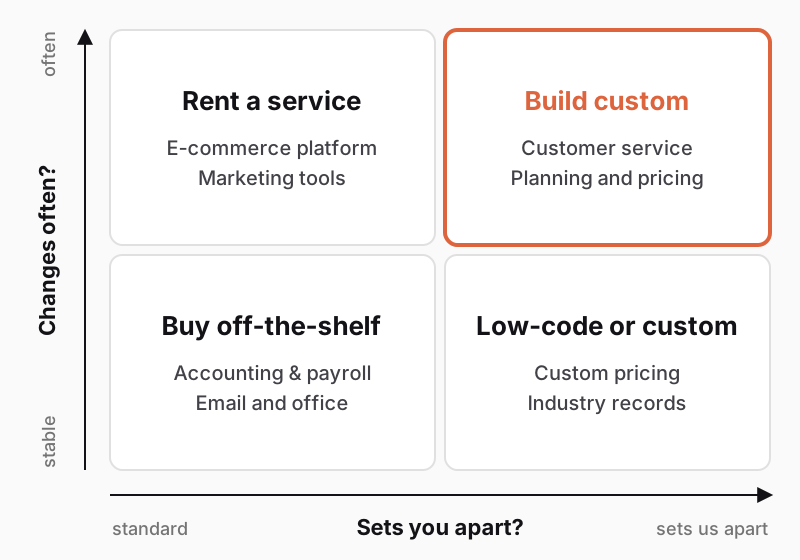
The same activity can sit in different quadrants for different firms. Price calculation is standard for a wholesaler with a fixed price list, yet core business for a cabinetmaker quoting every kitchen from scratch. Follow what your customers value in you.
Run this test in one afternoon:
Off-the-shelf software covers accounting, payroll, time tracking, invoicing, email, and a standard online store. Laws govern these areas, and the vendor tracks regulatory updates for you.
According to Czech national statistics (ČSÚ), half of companies with ten or more employees used an ERP system in 2025 (42% of small firms, 93% of large ones). Meanwhile, 36% used a CRM compared with the 29% European average (ČSÚ, ICT usage in enterprises 2025). On the Czech market, common examples include Pohoda, Money, ABRA Flexi, and Helios. Your choice depends on your industry, headcount, warehouse, accountant, and required integrations.
Test the system on your own data. Walk through three everyday scenarios in a trial version: taking an order, issuing an invoice, and handling a claim. Where the tool stalls on what sets you apart, consider a custom add-on.
With cloud tools, ask about your exit before signing:
Custom software pays off for workflows that set you apart from competitors:
A custom business system does not have to replace everything. Usually it handles only what off-the-shelf tools cannot and exchanges data with them—typically a portal where B2B buyers place orders and view their own prices and order status.
Custom development requires someone on your side who knows the workflow and has time to answer questions and decide. We describe the process from discovery to launch in How web and mobile app development works. Our business systems start from CZK 180,000 and web applications from CZK 230,000.
No-code and low-code are the fastest route to a simple app for forms, tracking, or approvals. You assemble it in your browser from ready-made blocks in days, often without a developer. It suits small internal teams and quick idea validation.
For example, a five-person auto shop can replace a paper loaner-car log in days with a form that tracks condition photos and active loans. Letting customers book cars themselves based on workshop capacity, however, will push past those limits.
The ceiling shows up once the app succeeds:
Shadow IT is another risk: one colleague builds the app, leaves, and nobody understands it. Assign every app an owner, data access rules, and a backup method.
Still, a no-code prototype works well as a specification. Before requesting development quotes, let your team use the prototype for a few weeks and write down what they miss.
Smaller firms most often choose a hybrid setup: an off-the-shelf core for accounting and inventory paired with a custom add-on, such as a buyer portal or production scheduler. You pay only for the part that gives you an edge.
Systems exchange data automatically via interfaces (APIs). For instance, the Czech accounting system Pohoda offers XML communication to connect online stores and CRMs (Stormware interface documentation). We cover how this works in practice in Connecting your e-shop with accounting.
A tire wholesaler, for example, can keep accounting, inventory, and invoicing in an off-the-shelf tool and add just a custom portal for tire shops and garages. Buyers see their own prices and stock, and orders flow straight to the warehouse without retyping from emails and calls.
Compare costs over five years, not by the first invoice. Off-the-shelf software is billed monthly; custom software costs most upfront. Factor in:
Account for growth too: doubling your users doubles license fees, whereas running your own software scales much more slowly. See three cost scenarios in How much it costs to build and run an app over five years and pricing models in Fixed price vs. time and material.
The best brief for custom software is the spreadsheets running your workflow today. Columns show your data, formulas show your rules, and colors with notes capture statuses or exceptions. A vendor learns more from them in an hour than from ten pages of text.
Prepare your spreadsheets like this:
Do your answers point to custom development or a hybrid setup? Describe your workflow in our project configurator to get a brief with three solution options.
Custom software pays off for workflows that set you apart from competitors, change often, connect many systems, or trigger steep per-user licenses for dozens of people. For routine work (accounting, payroll), an off-the-shelf system is better value. Combining both is common.
Upfront, usually yes, since you pay for development ahead of time. Over five years, the math can flip: off-the-shelf tools charge monthly per user, plus customizations and staff time spent working around limits. Compare five-year total costs, including operations, updates, and migration.
Browser-based platforms where you assemble an app from ready-made parts (forms, tables, rules) with no coding (no-code) or minimal code (low-code). They suit internal tools and testing ideas, but hit limits on complex permissions, large datasets, and per-user pricing.
Under Czech law (Section 58(7) of the Copyright Act), commissioned software counts as an employee work, treating the client as the employer. When an agency delivers it with its own developers, however, the contract decides in practice. Define the scope of rights and handover of source code and documentation in your contract. This answer is not legal advice.
Handpicked topics for you
Development is just the tip of the iceberg. See what drives custom app pricing, what five years of operation and growth cost, and how to compare quotes.
Fixed price looks safe, yet risk hides in a markup or change disputes. See why estimates are uncertain and how to pick a payment model for your project.
Digitalized companies adapt faster to change, respond more efficiently to demand, and make data-driven decisions.
Off-the-shelf software covers most daily work. Build custom only what sets you apart. Use our quick test, see where no-code hits its ceiling, and compare five-year costs.
Custom software pays off only where you differ from competitors—such as customer service, production planning, or job quoting. For everything else, from accounting and payroll to email, it costs less to buy an off-the-shelf system and adapt to it.
A third path is no-code and low-code platforms, where you assemble an app from ready-made blocks. Below, we share a quick build-vs-buy test, show where no-code hits its ceiling, compare five-year costs, and explain why Excel spreadsheets make the best brief for a custom business system.
You can buy business software off the shelf, assemble it on a no-code platform, or have it custom-built. Each path differs in upfront price, speed, and vendor lock-in.
Think of it like buying a suit:
| Path | Upfront cost | Speed | Flexibility | Lock-in |
|---|---|---|---|---|
| Off-the-shelf (packaged, SaaS) | low upfront, then licenses | days to weeks | low, you adapt to it | vendor and pricing |
| No-code and low-code | low to medium | weeks | medium, up to platform ceiling | platform |
| Custom development | highest upfront | weeks to months | high | vendor (without code and docs) |
Off-the-shelf systems include both packaged software you install and monthly cloud services (SaaS). On no-code and low-code platforms, you build an app in your browser from forms and rules with little or no coding. Custom software is designed and programmed around your workflows.
Some lock-in is unavoidable: packaged software vendors set prices and features, while no-code platforms cap what you can build. With custom software, you are locked in only if you lack the source code, documentation, and usage rights.
One question decides whether to build or buy: does this set your business apart? Developer Martin Fowler splits software into two categories (Martin Fowler, Utility vs Strategic Dichotomy):
Most companies treat too many things as strategic. Fowler notes it is closer to one project in twenty than one in five.
The second question is how often the workflow changes. Fast-changing workflows need software that is easy to adjust; stable ones do fine with simpler tools.
The same activity can sit in different quadrants for different firms. Price calculation is standard for a wholesaler with a fixed price list, yet core business for a cabinetmaker quoting every kitchen from scratch. Follow what your customers value in you.
Run this test in one afternoon:
Off-the-shelf software covers accounting, payroll, time tracking, invoicing, email, and a standard online store. Laws govern these areas, and the vendor tracks regulatory updates for you.
According to Czech national statistics (ČSÚ), half of companies with ten or more employees used an ERP system in 2025 (42% of small firms, 93% of large ones). Meanwhile, 36% used a CRM compared with the 29% European average (ČSÚ, ICT usage in enterprises 2025). On the Czech market, common examples include Pohoda, Money, ABRA Flexi, and Helios. Your choice depends on your industry, headcount, warehouse, accountant, and required integrations.
Test the system on your own data. Walk through three everyday scenarios in a trial version: taking an order, issuing an invoice, and handling a claim. Where the tool stalls on what sets you apart, consider a custom add-on.
With cloud tools, ask about your exit before signing:
Custom software pays off for workflows that set you apart from competitors:
A custom business system does not have to replace everything. Usually it handles only what off-the-shelf tools cannot and exchanges data with them—typically a portal where B2B buyers place orders and view their own prices and order status.
Custom development requires someone on your side who knows the workflow and has time to answer questions and decide. We describe the process from discovery to launch in How web and mobile app development works. Our business systems start from CZK 180,000 and web applications from CZK 230,000.
No-code and low-code are the fastest route to a simple app for forms, tracking, or approvals. You assemble it in your browser from ready-made blocks in days, often without a developer. It suits small internal teams and quick idea validation.
For example, a five-person auto shop can replace a paper loaner-car log in days with a form that tracks condition photos and active loans. Letting customers book cars themselves based on workshop capacity, however, will push past those limits.
The ceiling shows up once the app succeeds:
Shadow IT is another risk: one colleague builds the app, leaves, and nobody understands it. Assign every app an owner, data access rules, and a backup method.
Still, a no-code prototype works well as a specification. Before requesting development quotes, let your team use the prototype for a few weeks and write down what they miss.
Smaller firms most often choose a hybrid setup: an off-the-shelf core for accounting and inventory paired with a custom add-on, such as a buyer portal or production scheduler. You pay only for the part that gives you an edge.
Systems exchange data automatically via interfaces (APIs). For instance, the Czech accounting system Pohoda offers XML communication to connect online stores and CRMs (Stormware interface documentation). We cover how this works in practice in Connecting your e-shop with accounting.
A tire wholesaler, for example, can keep accounting, inventory, and invoicing in an off-the-shelf tool and add just a custom portal for tire shops and garages. Buyers see their own prices and stock, and orders flow straight to the warehouse without retyping from emails and calls.
Compare costs over five years, not by the first invoice. Off-the-shelf software is billed monthly; custom software costs most upfront. Factor in:
Account for growth too: doubling your users doubles license fees, whereas running your own software scales much more slowly. See three cost scenarios in How much it costs to build and run an app over five years and pricing models in Fixed price vs. time and material.
The best brief for custom software is the spreadsheets running your workflow today. Columns show your data, formulas show your rules, and colors with notes capture statuses or exceptions. A vendor learns more from them in an hour than from ten pages of text.
Prepare your spreadsheets like this:
Do your answers point to custom development or a hybrid setup? Describe your workflow in our project configurator to get a brief with three solution options.
Custom software pays off for workflows that set you apart from competitors, change often, connect many systems, or trigger steep per-user licenses for dozens of people. For routine work (accounting, payroll), an off-the-shelf system is better value. Combining both is common.
Upfront, usually yes, since you pay for development ahead of time. Over five years, the math can flip: off-the-shelf tools charge monthly per user, plus customizations and staff time spent working around limits. Compare five-year total costs, including operations, updates, and migration.
Browser-based platforms where you assemble an app from ready-made parts (forms, tables, rules) with no coding (no-code) or minimal code (low-code). They suit internal tools and testing ideas, but hit limits on complex permissions, large datasets, and per-user pricing.
Under Czech law (Section 58(7) of the Copyright Act), commissioned software counts as an employee work, treating the client as the employer. When an agency delivers it with its own developers, however, the contract decides in practice. Define the scope of rights and handover of source code and documentation in your contract. This answer is not legal advice.
Handpicked topics for you
Development is just the tip of the iceberg. See what drives custom app pricing, what five years of operation and growth cost, and how to compare quotes.
Fixed price looks safe, yet risk hides in a markup or change disputes. See why estimates are uncertain and how to pick a payment model for your project.
Digitalized companies adapt faster to change, respond more efficiently to demand, and make data-driven decisions.