
Business process automation: what pays off and your ROI
Automate frequent tasks with clear rules where mistakes cost money. A two-week audit and 30 minutes of math show you where to start and what to keep manual.
Typing orders into accounting by hand wastes time and breeds errors. See how to connect your systems, when a plugin is enough, and what to avoid.

E-commerce accounting integration and inventory sync move orders, invoices, and stock levels between systems automatically. You can use a ready-made plugin, an integration platform (Make, Zapier, n8n), or a custom API integration. The right choice depends on your order volume, your tools, and who monitors the connection.
Manual entry wastes time and introduces errors. Below, you will find API integration explained alongside webhooks and feeds, how to map your data flows, and what to watch out for: who owns each piece of data, what happens during an outage, and what ongoing operations cost.
Typing data by hand costs time, breeds mistakes, and causes delays. A few orders a day are manageable, but hundreds a month take a part-time role.
Mistakes cost even more. A typo in an order number, a missed discount, or a miscounted item leads to wrong invoices, oversold stock, and hours reconciling numbers. Credit notes and apologies take longer than the order itself.
Delays hurt too. If you update stock once a night, your store shows morning numbers all day and easily sells the last items twice.
Run the math with your own numbers:
Multiply those hours by your hourly rate to see what an integration is worth. Factor in ongoing operating costs too.
APIs, webhooks, feeds, and exports are four ways systems pass data. They differ in who asks, when, and how often. Once you know them, you can check what your store or accounting software supports.
| Term | Analogy | What it does |
|---|---|---|
| API (interface) | Waiter | Requests data or sends an action and gets a reply |
| Webhook | Doorbell | Announces an event on its own, like a new order |
| Feed | Posted menu | A regularly published list, e.g., products for comparison sites |
| Export and import | Box of papers | A file downloaded from one system and uploaded to another |
API (Application Programming Interface) works like a waiter. You place a request and get a response from the kitchen. Your store asks accounting for an invoice or checks inventory for stock. A good API specifies what you can ask for, in what format, and how often.
Webhook is a doorbell. Accounting does not have to ask for new orders every five minutes — the store rings as soon as an order arrives. Data moves right away without wasted requests.
Feed is a posted menu updated on a schedule. Typically an XML file of products, prices, and stock, it is pulled by price comparison sites or partners. It is one-way: readers cannot edit it.
Export and import are boxes of papers carried between systems now and then. An accountant might upload store invoices once a week. It is the simplest option, but it lags and relies on someone remembering.
Before picking tools, sketch where data moves on paper. Each system (store, accounting, inventory, carrier, bank, Excel, email) is a box; arrows show the data passed between them.
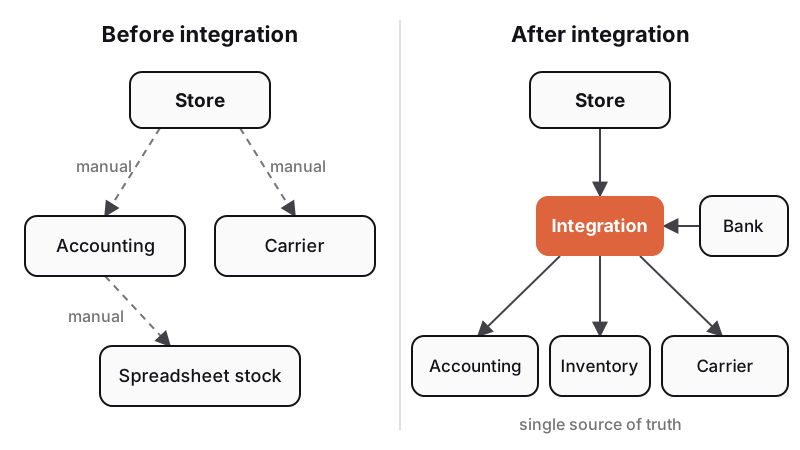
Follow these steps:
Four flows save the most time when connected:
A data flow map is a strong first step toward broader business process digitization.
In any e-commerce accounting integration, each piece of data needs one master system — a single source of truth. Other systems only read from it. Without this rule, store prices soon drift from accounting, and nobody knows which is right.
A typical split for a smaller store:
Why not sync everything both ways? If a record changes in two places at once, the sync may pick the wrong version or loop endlessly. Keep two-way sync strictly where needed. Define which system has the final say for every field.
A second requirement when you connect your online store to ERP or accounting is a shared identifier:
Unifying codes takes effort, but you do it once and prevent countless errors.
You can connect systems in three ways: a ready-made plugin, an integration platform, or custom API work. They differ in out-of-the-box features, cost, and maintenance.
| Option | When it fits | Main risk | Maintained by |
|---|---|---|---|
| Ready-made plugin | Standard store and accounting | Cannot handle your edge cases | Plugin vendor |
| Integration platform | Simpler flows, lower volume | Fees scale with volume, errors slip by | You or your agency |
| Custom integration | Custom workflows, many systems, high volume | Higher upfront cost, vendor reliance | Developer under SLA |
Ready-made plugin is the fastest path. Major store platforms offer plugins and exports for popular accounting tools, so you can set up the basics in an afternoon. If a plugin covers most needs and you handle the rest by hand, pick this.
Integration platform (Make, Zapier, n8n) links apps visually without code. Pricing scales with usage:
Platforms fit simpler flows. With hundreds of daily orders and complex logic, costs and clutter grow fast.
Custom integration pays off with custom rules (wholesale tiers, multi-warehouse, returns, bundles), multiple systems, or high volume. Expect a higher upfront budget and a maintenance agreement.
Every integration fails eventually — from an outage, a changed data format, or an expired key. What matters is finding out in a minute rather than a month.
A reliable integration has three safeguards:
Watch out for rate limits and expirations. Fio banka's API docs (version 1.9, October 16, 2025) state that a token can be queried at most once every 30 seconds before returning an error. Tokens expire after at most 180 days and renew only if auto-renewal is on and someone logs into online banking. A detail like that can silently halt payment sync six months in.
Third-party changes are another risk — carriers and banks release new API versions and retire old ones. Someone has to track updates and adjust the code.
Before launch, test everything on copied data or a staging environment. Test edge cases too: returns, credit notes, promo codes, duplicate payments, and post-dispatch cancellations.
Store API keys securely, grant least privilege, and rotate them when changing vendors. Read more in our guide to cybersecurity for businesses.
Integration costs have two parts: one-time setup and ongoing operations and maintenance, which often exceed the initial build over a few years.
Setup depends on the number of systems and flows, API quality, and edge cases (returns, credit notes, bundles, multiple warehouses). Ongoing costs cover platform or plugin fees, hosting, monitoring, and updates. Plugins follow published pricing; custom work scales with scope. Our business systems start from CZK 180,000, and an online store with inventory sync starts from CZK 140,000.
With a few dozen monthly orders and a weekly manual export, system integration will not pay back. It pays off when retyping eats hours each week, errors repeat, or delays cost you sales. For custom builds, make sure your contract gives you the source code, keys, and documentation in case you switch vendors.
A clear brief saves money:
Start with the most painful flow, usually orders to accounting. If you want to connect your store, accounting, and inventory, try our project configurator for an initial solution outline.
You can connect to Pohoda (Czech accounting software) in three ways:
Check your store's capabilities and your Pohoda edition first.
An API (Application Programming Interface) passes data and commands between software programs, much like a waiter. With an API integration, your store requests invoices from accounting, your bank sends transactions, and your carrier generates shipping labels without manual typing.
A ready-made plugin fits a standard store, mainstream accounting software, and standard workflows. Choose custom integration when you have custom rules (wholesale pricing, multiple warehouses, bundles), several systems, or high order volume. Often a plugin handles the core, and custom code covers the rest.
Pricing depends on the number of systems, API quality, and edge cases. Plugins and platforms charge published rates, often monthly by volume. Custom builds carry a one-time development fee plus ongoing monitoring and maintenance. Always budget for ongoing operations.
Handpicked topics for you
Automate frequent tasks with clear rules where mistakes cost money. A two-week audit and 30 minutes of math show you where to start and what to keep manual.
Business buyers want consumer-grade convenience: ordering anytime, by SKU, at contract prices. A B2B portal lets wholesalers serve more accounts without adding phone staff.
Attackers need very little to breach smaller firms. Here are 10 low-cost steps and how the new Czech NIS2 law affects you, even if you are not regulated.
Typing orders into accounting by hand wastes time and breeds errors. See how to connect your systems, when a plugin is enough, and what to avoid.
E-commerce accounting integration and inventory sync move orders, invoices, and stock levels between systems automatically. You can use a ready-made plugin, an integration platform (Make, Zapier, n8n), or a custom API integration. The right choice depends on your order volume, your tools, and who monitors the connection.
Manual entry wastes time and introduces errors. Below, you will find API integration explained alongside webhooks and feeds, how to map your data flows, and what to watch out for: who owns each piece of data, what happens during an outage, and what ongoing operations cost.
Typing data by hand costs time, breeds mistakes, and causes delays. A few orders a day are manageable, but hundreds a month take a part-time role.
Mistakes cost even more. A typo in an order number, a missed discount, or a miscounted item leads to wrong invoices, oversold stock, and hours reconciling numbers. Credit notes and apologies take longer than the order itself.
Delays hurt too. If you update stock once a night, your store shows morning numbers all day and easily sells the last items twice.
Run the math with your own numbers:
Multiply those hours by your hourly rate to see what an integration is worth. Factor in ongoing operating costs too.
APIs, webhooks, feeds, and exports are four ways systems pass data. They differ in who asks, when, and how often. Once you know them, you can check what your store or accounting software supports.
| Term | Analogy | What it does |
|---|---|---|
| API (interface) | Waiter | Requests data or sends an action and gets a reply |
| Webhook | Doorbell | Announces an event on its own, like a new order |
| Feed | Posted menu | A regularly published list, e.g., products for comparison sites |
| Export and import | Box of papers | A file downloaded from one system and uploaded to another |
API (Application Programming Interface) works like a waiter. You place a request and get a response from the kitchen. Your store asks accounting for an invoice or checks inventory for stock. A good API specifies what you can ask for, in what format, and how often.
Webhook is a doorbell. Accounting does not have to ask for new orders every five minutes — the store rings as soon as an order arrives. Data moves right away without wasted requests.
Feed is a posted menu updated on a schedule. Typically an XML file of products, prices, and stock, it is pulled by price comparison sites or partners. It is one-way: readers cannot edit it.
Export and import are boxes of papers carried between systems now and then. An accountant might upload store invoices once a week. It is the simplest option, but it lags and relies on someone remembering.
Before picking tools, sketch where data moves on paper. Each system (store, accounting, inventory, carrier, bank, Excel, email) is a box; arrows show the data passed between them.
Follow these steps:
Four flows save the most time when connected:
A data flow map is a strong first step toward broader business process digitization.
In any e-commerce accounting integration, each piece of data needs one master system — a single source of truth. Other systems only read from it. Without this rule, store prices soon drift from accounting, and nobody knows which is right.
A typical split for a smaller store:
Why not sync everything both ways? If a record changes in two places at once, the sync may pick the wrong version or loop endlessly. Keep two-way sync strictly where needed. Define which system has the final say for every field.
A second requirement when you connect your online store to ERP or accounting is a shared identifier:
Unifying codes takes effort, but you do it once and prevent countless errors.
You can connect systems in three ways: a ready-made plugin, an integration platform, or custom API work. They differ in out-of-the-box features, cost, and maintenance.
| Option | When it fits | Main risk | Maintained by |
|---|---|---|---|
| Ready-made plugin | Standard store and accounting | Cannot handle your edge cases | Plugin vendor |
| Integration platform | Simpler flows, lower volume | Fees scale with volume, errors slip by | You or your agency |
| Custom integration | Custom workflows, many systems, high volume | Higher upfront cost, vendor reliance | Developer under SLA |
Ready-made plugin is the fastest path. Major store platforms offer plugins and exports for popular accounting tools, so you can set up the basics in an afternoon. If a plugin covers most needs and you handle the rest by hand, pick this.
Integration platform (Make, Zapier, n8n) links apps visually without code. Pricing scales with usage:
Platforms fit simpler flows. With hundreds of daily orders and complex logic, costs and clutter grow fast.
Custom integration pays off with custom rules (wholesale tiers, multi-warehouse, returns, bundles), multiple systems, or high volume. Expect a higher upfront budget and a maintenance agreement.
Every integration fails eventually — from an outage, a changed data format, or an expired key. What matters is finding out in a minute rather than a month.
A reliable integration has three safeguards:
Watch out for rate limits and expirations. Fio banka's API docs (version 1.9, October 16, 2025) state that a token can be queried at most once every 30 seconds before returning an error. Tokens expire after at most 180 days and renew only if auto-renewal is on and someone logs into online banking. A detail like that can silently halt payment sync six months in.
Third-party changes are another risk — carriers and banks release new API versions and retire old ones. Someone has to track updates and adjust the code.
Before launch, test everything on copied data or a staging environment. Test edge cases too: returns, credit notes, promo codes, duplicate payments, and post-dispatch cancellations.
Store API keys securely, grant least privilege, and rotate them when changing vendors. Read more in our guide to cybersecurity for businesses.
Integration costs have two parts: one-time setup and ongoing operations and maintenance, which often exceed the initial build over a few years.
Setup depends on the number of systems and flows, API quality, and edge cases (returns, credit notes, bundles, multiple warehouses). Ongoing costs cover platform or plugin fees, hosting, monitoring, and updates. Plugins follow published pricing; custom work scales with scope. Our business systems start from CZK 180,000, and an online store with inventory sync starts from CZK 140,000.
With a few dozen monthly orders and a weekly manual export, system integration will not pay back. It pays off when retyping eats hours each week, errors repeat, or delays cost you sales. For custom builds, make sure your contract gives you the source code, keys, and documentation in case you switch vendors.
A clear brief saves money:
Start with the most painful flow, usually orders to accounting. If you want to connect your store, accounting, and inventory, try our project configurator for an initial solution outline.
You can connect to Pohoda (Czech accounting software) in three ways:
Check your store's capabilities and your Pohoda edition first.
An API (Application Programming Interface) passes data and commands between software programs, much like a waiter. With an API integration, your store requests invoices from accounting, your bank sends transactions, and your carrier generates shipping labels without manual typing.
A ready-made plugin fits a standard store, mainstream accounting software, and standard workflows. Choose custom integration when you have custom rules (wholesale pricing, multiple warehouses, bundles), several systems, or high order volume. Often a plugin handles the core, and custom code covers the rest.
Pricing depends on the number of systems, API quality, and edge cases. Plugins and platforms charge published rates, often monthly by volume. Custom builds carry a one-time development fee plus ongoing monitoring and maintenance. Always budget for ongoing operations.
Handpicked topics for you
Automate frequent tasks with clear rules where mistakes cost money. A two-week audit and 30 minutes of math show you where to start and what to keep manual.
Business buyers want consumer-grade convenience: ordering anytime, by SKU, at contract prices. A B2B portal lets wholesalers serve more accounts without adding phone staff.
Attackers need very little to breach smaller firms. Here are 10 low-cost steps and how the new Czech NIS2 law affects you, even if you are not regulated.