
AI for small business: what actually pays off
In 2026, a third of Czech firms with 10+ staff used AI. We show what pays off for small businesses, what to hold off on, and how to start without wasted spend.
Automate frequent tasks with clear rules where mistakes cost money. A two-week audit and 30 minutes of math show you where to start and what to keep manual.

Business process automation pays off when work repeats often, follows clear rules, and errors cost money. You can spot these tasks with a two-week audit and 30 minutes of math: measure the time spent on repetitive tasks, score them, and calculate the automation ROI for your top candidate.
Below you will find a scoring table to pick processes, a time-savings chart, an ROI formula with an example, a tool ladder from templates to custom integrations, and a 30-day pilot plan. We also show when to leave work to people.
Business process automation means software handles repetitive steps by set rules: copying orders to inventory, issuing invoices, or sending reminders. Your team focuses on customers, exceptions, and decisions.
It fixes nothing on its own. It makes a good workflow faster and cheaper, and a chaotic one faster at making mistakes. With a bad recipe, a new bakery line only bakes more bad bread. Before picking a tool, map the process with five questions:
If colleagues disagree, standardize the process first. If you are new to going digital, read why and how to digitize your business.
In 2025, only 4% of Czech businesses with 10 or more employees used AI-driven automation (software robots, RPA), compared to 5% in the EU (ČSÚ, Statistika&My, May 2026). For example, it frees accounting teams from typing invoices by hand.
Current technologies, including generative AI, have the technical potential to automate tasks taking up 60% to 70% of employees' time (McKinsey, 2023). This applies to individual tasks, not entire jobs. Almost every department has candidates for automation.
For two weeks, have your team log repetitive tasks in a shared sheet (add monthly and quarterly ones from the calendar). Five columns and minute estimates are enough: what they do, how often, how long it takes, in which apps, and what an error causes.
Typical examples include copying orders from email or an e-shop, matching payments, sending reminders, building weekly reports, setting up accounts for new hires, reordering stock, or an auto shop calling clients twice a year for seasonal tire changes.
Next, score each task from 1 to 3 across five criteria:
| Criterion | 1 point | 2 points | 3 points |
|---|---|---|---|
| Frequency | monthly or less | weekly | daily or more |
| Time per task | under 2 min | 2–15 min | over 15 min |
| Cost of error | minor fix | complaint, delay | lost money or client |
| Clear rules | different every time | mostly the same | always the same |
| Systems used | one app | two apps | three or more, manual copying |
Wherever a colleague says "it depends," you lack a written rule. Leave the decision to a person and automate only data collection, document drafting, or sending.
Automating a process must take no more time than it saves. This table shows 5-year time savings (at 250 workdays, 52 weeks, and 12 months per year) by frequency and time saved per run. It is inspired by the comic Is It Worth the Time? (xkcd 1205).
| Time saved per run | 20× daily | daily | weekly | monthly |
|---|---|---|---|---|
| 30 seconds | 208 h | 10 h | 2 h | 0.5 h |
| 2 minutes | 833 h | 42 h | 9 h | 2 h |
| 5 minutes | 2,083 h | 104 h | 22 h | 5 h |
| 15 minutes | 6,250 h | 313 h | 65 h | 15 h |
| 1 hour | 25,000 h | 1,250 h | 260 h | 60 h |
Saving two minutes a day adds up to about 42 hours (one workweek) over five years. If setup and maintenance take longer, it does not pay off in time—unless you do it to cut errors. Conversely, half a minute saved 20 times a day frees up over 200 hours. Frequent small tasks beat rare big ones.
Count only net time saved, excluding exception checks and approvals. Subtract time for maintenance and fixes when systems change. This table works for a rough cut; before paying for a license or vendor, calculate financial ROI.
To find your payback period in months, divide one-time costs by net monthly savings:
A fictional wholesaler receives 30 email orders a day and spends 4 minutes typing each into inventory. Automation creates the order and a person just checks it, saving 3 minutes. Across 21 workdays, that is 30 × 3 × 21 = 1,890 minutes, or 31.5 hours a month.
At a full hourly cost of CZK 400, saved time equals CZK 12,600 a month. It also prevents 2 faulty orders a month at CZK 1,500 each (CZK 3,000). Operation and maintenance cost CZK 1,500 a month. Net monthly savings are 12,600 + 3,000 − 1,500 = CZK 14,100.
With a one-time cost of CZK 120,000, the investment pays back in 120,000 / 14,100, or roughly 8.5 months. Plug in your own measurable numbers; treat intangible benefits only as a bonus.
Automating business workflows has five tiers. Start at the lowest one that meets your needs—each higher tier does more, but costs more to build and maintain.
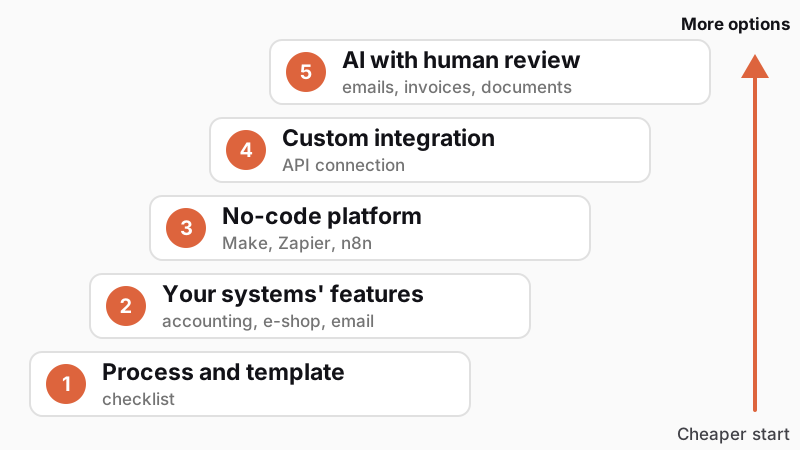
1. Process and template. A written workflow, checklist, or email template costs nothing and cuts errors. You outgrow it when work scales faster than your team.
2. Features in systems you already own. Your accounting tool, e-shop, bank, and email already include automations (mail sorting, payment reminders, bank statement imports, carrier links). They are included in your license, so check them first.
3. No-code automation. Make, Zapier, n8n, or Microsoft Power Automate connect apps without coding. Watch how they bill (as of November 2026):
These platforms fall short on complex logic, high volumes (costs grow with steps), apps without connectors, and workflows needing tests, backups, and transfer logs.
4. Custom integration. A developer connects systems via APIs with error handling, logging, and tests. It pays off for core workflows, high volumes, and missing connectors. We build these into custom business systems; see how it works in our article on connecting an e-shop with accounting.
5. Artificial intelligence. AI processes unstructured inputs (emails, contracts, invoices): it reads the data, and rules with integrations finish the rest.
Combine the tiers. A small business can start with a written process and one no-code workflow. Move up only when a lower tier provably falls short.
If you can write a step as "if X, then Y," cheaper and more reliable rules are enough: they match payments by reference number, draft purchase orders when stock drops below a minimum, or send reminders a week past due.
Use AI for inputs without a fixed layout: free-form emails, varied invoices, contracts, or receipt photos. The model extracts data and hands it to rule-based automation. According to the Czech Statistical Office (ČSÚ), 13% of firms with 10 or more employees used generative AI for text in 2025, while only 2% used document and object recognition.
Always check AI outputs—it makes mistakes very convincingly. Have a person approve uncertain cases and spot-check a sample of the rest. We cover more in these articles:
Test automation in a 30-day pilot on one process. You will get real numbers and see where it snags.
Watch out for four risks:
To see what automating your business workflows would involve, try our project configurator: from your answers, it builds a brief and three solution options.
Business process automation means software handles repetitive steps by set rules (copying orders, invoicing, reminders) while people handle only exceptions. It can be a built-in feature in your software, a no-code platform, a custom integration, or AI for emails and documents.
Start with tasks that repeat daily or weekly, take several minutes, follow clear rules, and carry a cost when mistakes happen—typically copying orders, payments, and invoices between apps. You can find them with a two-week audit and score them across five criteria.
Calculate automation ROI from measurable gains: take monthly savings (saved hours × full hourly cost + avoided error costs) and subtract monthly operating costs (licenses, maintenance, review). Divide one-time setup costs by net monthly savings to get your payback period in months.
No-code automation (Make, Zapier, n8n, Microsoft Power Automate) connects apps without coding. It works for simpler workflows and smaller volumes. When a connector is missing, logic gets complex, high volumes drive up costs, or you need tests, backups, and transfer logs, choose a custom integration.
Handpicked topics for you
In 2026, a third of Czech firms with 10+ staff used AI. We show what pays off for small businesses, what to hold off on, and how to start without wasted spend.
Typing orders into accounting by hand wastes time and breeds errors. See how to connect your systems, when a plugin is enough, and what to avoid.
Digitalized companies adapt faster to change, respond more efficiently to demand, and make data-driven decisions.
Automate frequent tasks with clear rules where mistakes cost money. A two-week audit and 30 minutes of math show you where to start and what to keep manual.
Business process automation pays off when work repeats often, follows clear rules, and errors cost money. You can spot these tasks with a two-week audit and 30 minutes of math: measure the time spent on repetitive tasks, score them, and calculate the automation ROI for your top candidate.
Below you will find a scoring table to pick processes, a time-savings chart, an ROI formula with an example, a tool ladder from templates to custom integrations, and a 30-day pilot plan. We also show when to leave work to people.
Business process automation means software handles repetitive steps by set rules: copying orders to inventory, issuing invoices, or sending reminders. Your team focuses on customers, exceptions, and decisions.
It fixes nothing on its own. It makes a good workflow faster and cheaper, and a chaotic one faster at making mistakes. With a bad recipe, a new bakery line only bakes more bad bread. Before picking a tool, map the process with five questions:
If colleagues disagree, standardize the process first. If you are new to going digital, read why and how to digitize your business.
In 2025, only 4% of Czech businesses with 10 or more employees used AI-driven automation (software robots, RPA), compared to 5% in the EU (ČSÚ, Statistika&My, May 2026). For example, it frees accounting teams from typing invoices by hand.
Current technologies, including generative AI, have the technical potential to automate tasks taking up 60% to 70% of employees' time (McKinsey, 2023). This applies to individual tasks, not entire jobs. Almost every department has candidates for automation.
For two weeks, have your team log repetitive tasks in a shared sheet (add monthly and quarterly ones from the calendar). Five columns and minute estimates are enough: what they do, how often, how long it takes, in which apps, and what an error causes.
Typical examples include copying orders from email or an e-shop, matching payments, sending reminders, building weekly reports, setting up accounts for new hires, reordering stock, or an auto shop calling clients twice a year for seasonal tire changes.
Next, score each task from 1 to 3 across five criteria:
| Criterion | 1 point | 2 points | 3 points |
|---|---|---|---|
| Frequency | monthly or less | weekly | daily or more |
| Time per task | under 2 min | 2–15 min | over 15 min |
| Cost of error | minor fix | complaint, delay | lost money or client |
| Clear rules | different every time | mostly the same | always the same |
| Systems used | one app | two apps | three or more, manual copying |
Wherever a colleague says "it depends," you lack a written rule. Leave the decision to a person and automate only data collection, document drafting, or sending.
Automating a process must take no more time than it saves. This table shows 5-year time savings (at 250 workdays, 52 weeks, and 12 months per year) by frequency and time saved per run. It is inspired by the comic Is It Worth the Time? (xkcd 1205).
| Time saved per run | 20× daily | daily | weekly | monthly |
|---|---|---|---|---|
| 30 seconds | 208 h | 10 h | 2 h | 0.5 h |
| 2 minutes | 833 h | 42 h | 9 h | 2 h |
| 5 minutes | 2,083 h | 104 h | 22 h | 5 h |
| 15 minutes | 6,250 h | 313 h | 65 h | 15 h |
| 1 hour | 25,000 h | 1,250 h | 260 h | 60 h |
Saving two minutes a day adds up to about 42 hours (one workweek) over five years. If setup and maintenance take longer, it does not pay off in time—unless you do it to cut errors. Conversely, half a minute saved 20 times a day frees up over 200 hours. Frequent small tasks beat rare big ones.
Count only net time saved, excluding exception checks and approvals. Subtract time for maintenance and fixes when systems change. This table works for a rough cut; before paying for a license or vendor, calculate financial ROI.
To find your payback period in months, divide one-time costs by net monthly savings:
A fictional wholesaler receives 30 email orders a day and spends 4 minutes typing each into inventory. Automation creates the order and a person just checks it, saving 3 minutes. Across 21 workdays, that is 30 × 3 × 21 = 1,890 minutes, or 31.5 hours a month.
At a full hourly cost of CZK 400, saved time equals CZK 12,600 a month. It also prevents 2 faulty orders a month at CZK 1,500 each (CZK 3,000). Operation and maintenance cost CZK 1,500 a month. Net monthly savings are 12,600 + 3,000 − 1,500 = CZK 14,100.
With a one-time cost of CZK 120,000, the investment pays back in 120,000 / 14,100, or roughly 8.5 months. Plug in your own measurable numbers; treat intangible benefits only as a bonus.
Automating business workflows has five tiers. Start at the lowest one that meets your needs—each higher tier does more, but costs more to build and maintain.
1. Process and template. A written workflow, checklist, or email template costs nothing and cuts errors. You outgrow it when work scales faster than your team.
2. Features in systems you already own. Your accounting tool, e-shop, bank, and email already include automations (mail sorting, payment reminders, bank statement imports, carrier links). They are included in your license, so check them first.
3. No-code automation. Make, Zapier, n8n, or Microsoft Power Automate connect apps without coding. Watch how they bill (as of November 2026):
These platforms fall short on complex logic, high volumes (costs grow with steps), apps without connectors, and workflows needing tests, backups, and transfer logs.
4. Custom integration. A developer connects systems via APIs with error handling, logging, and tests. It pays off for core workflows, high volumes, and missing connectors. We build these into custom business systems; see how it works in our article on connecting an e-shop with accounting.
5. Artificial intelligence. AI processes unstructured inputs (emails, contracts, invoices): it reads the data, and rules with integrations finish the rest.
Combine the tiers. A small business can start with a written process and one no-code workflow. Move up only when a lower tier provably falls short.
If you can write a step as "if X, then Y," cheaper and more reliable rules are enough: they match payments by reference number, draft purchase orders when stock drops below a minimum, or send reminders a week past due.
Use AI for inputs without a fixed layout: free-form emails, varied invoices, contracts, or receipt photos. The model extracts data and hands it to rule-based automation. According to the Czech Statistical Office (ČSÚ), 13% of firms with 10 or more employees used generative AI for text in 2025, while only 2% used document and object recognition.
Always check AI outputs—it makes mistakes very convincingly. Have a person approve uncertain cases and spot-check a sample of the rest. We cover more in these articles:
Test automation in a 30-day pilot on one process. You will get real numbers and see where it snags.
Watch out for four risks:
To see what automating your business workflows would involve, try our project configurator: from your answers, it builds a brief and three solution options.
Business process automation means software handles repetitive steps by set rules (copying orders, invoicing, reminders) while people handle only exceptions. It can be a built-in feature in your software, a no-code platform, a custom integration, or AI for emails and documents.
Start with tasks that repeat daily or weekly, take several minutes, follow clear rules, and carry a cost when mistakes happen—typically copying orders, payments, and invoices between apps. You can find them with a two-week audit and score them across five criteria.
Calculate automation ROI from measurable gains: take monthly savings (saved hours × full hourly cost + avoided error costs) and subtract monthly operating costs (licenses, maintenance, review). Divide one-time setup costs by net monthly savings to get your payback period in months.
No-code automation (Make, Zapier, n8n, Microsoft Power Automate) connects apps without coding. It works for simpler workflows and smaller volumes. When a connector is missing, logic gets complex, high volumes drive up costs, or you need tests, backups, and transfer logs, choose a custom integration.
Handpicked topics for you
In 2026, a third of Czech firms with 10+ staff used AI. We show what pays off for small businesses, what to hold off on, and how to start without wasted spend.
Typing orders into accounting by hand wastes time and breeds errors. See how to connect your systems, when a plugin is enough, and what to avoid.
Digitalized companies adapt faster to change, respond more efficiently to demand, and make data-driven decisions.