
Business process automation: what pays off and your ROI
Automate frequent tasks with clear rules where mistakes cost money. A two-week audit and 30 minutes of math show you where to start and what to keep manual.
In 2026, a third of Czech firms with 10+ staff used AI. We show what pays off for small businesses, what to hold off on, and how to start without wasted spend.

AI for small business pays off when it changes workflows, not when it just adds another app. It saves time on repetitive text work, customer inquiries, and documents. Autonomous systems that decide and act on your company's behalf are still more of a risk than a saving.
According to Czech national statistics (ČSÚ), 35% of Czech firms with 10 or more employees used AI in 2026—double the year before. Gains come not from the tool itself, but from workflow changes, clear rules for your team, and measuring outcomes. Below you will find Czech and EU adoption data, 12 business AI use cases by department, 5 uses to hold off on, EU legal basics, and a 90-day plan.
According to a Czech Statistical Office (ČSÚ) survey from November 5, 2026, 35% of Czech enterprises with 10 or more employees used AI in 2026, up from 18% in 2025 and just 6% in 2023—a sixfold jump in three years.
In 2026, AI was used by 74% of large firms (250+ staff), 50% of mid-sized firms, and 30% of small ones (10 to 49 staff). Small firms are growing fastest, more than doubling from 13% in 2025.
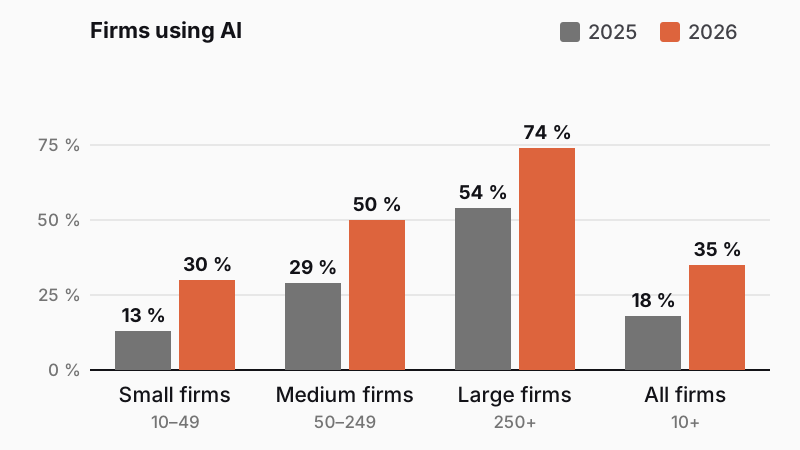
How businesses use AI in 2026:
Most companies thus use AI as a personal assistant rather than part of their workflows. In 2025, 59% of AI-using firms deployed it in marketing, sales, or support, and 40% in management, administration, or HR (ČSÚ, 2025).
Across the EU, Czech firms sat slightly below average in 2025: 18% versus 20% EU-wide, with Denmark leading at 42% (Eurostat, December 2025). The data excludes firms under 10 employees; the same advice applies to them, just with a smaller pilot.
BCG's study The Widening AI Value Gap (September 2025) found that only 5% of companies globally get substantial value from AI, 35% are starting to see gains, and 60% see almost none. In October 2024, BCG reported that 22% of firms had moved past trials and 4% achieved substantial value.
Successful companies change people and workflows, not just technology. Think of a warehouse where staff find goods from memory: a faster forklift saves no time until you label the shelves. Without a clear process, AI just speeds up chaos.
Take an 8-person accounting firm: if everyone writes emails with a chatbot, they save an unmeasurable few minutes. When clients send documents to one inbox, AI extracts the fields, and accountants check only exceptions, you measure the savings in hours per month.
Firms where AI pays off do three things:
If your workflows run on paper, in email, and in people's heads, start by digitizing them. AI needs digital data and a documented process.
Smaller firms gain most where text or document work repeats and a person checks the result. This table groups the main options by department:
| Use case | Department | Effort | Risk |
|---|---|---|---|
| Draft replies to common questions | Customer support | low | medium |
| Sorting emails and requests | Customer support | medium | low |
| Summarizing meetings and documents | Management | low | low |
| Product copy, social posts, and newsletters | Marketing | low | low |
| Translations for foreign customers | Sales | low | medium |
| Quotes from templates and price lists | Sales | medium | medium |
| Extracting data from invoices and documents | Finance | medium | medium |
| Formulas, spreadsheets, and reports | Finance | low | low |
| Searching internal documents | Operations | medium | medium |
| Demand and inventory forecasting | Operations | high | medium |
| Photo-based quality checks | Manufacturing | high | medium |
| Job ads and onboarding materials | HR | low | low |
Low effort takes a business version of a standard tool and a clear prompt. Medium effort means connecting your data (a shared folder, online store, or accounting software). High effort requires longer data preparation or a custom model—such as multi-season sales history for demand forecasting.
Judge risk by who sees a mistake. An error in meeting notes stays internal, but one in a quote, translation, or customer reply can cost you an order. For medium-risk tasks, let AI draft the work and a person approve it.
Cleaner source materials make the output cheaper and more reliable:
Find details in our guides:
Hold off on autonomous AI anywhere an error costs money, harms someone, or binds you by contract. Language models write convincingly even when wrong. No vendor can fully prevent these hallucinations today.
One rule applies everywhere: AI prepares, people decide. A so-called agent sends emails, orders stock, or edits system records on its own. Small firms lack staff to watch it all day, so start with drafts for approval. Grant an agent more authority only after a measured pilot, with clear limits (maximum amount, allowed actions) and a full log of everything it did.
For decisions about people (screening resumes, scoring candidates, and evaluating employee performance and behavior), the EU AI Act sets stricter obligations. AI can still write job ads or interview questions.
Pick your first project by impact and feasibility. Aim for frequent, tedious work with clear rules, digital data, and quick human review.
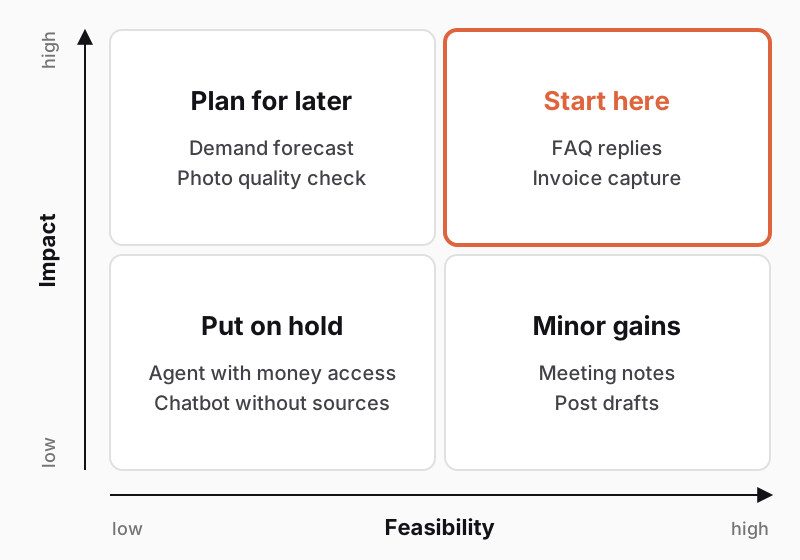
How to use the matrix:
For individual tasks (copy, summaries, translations), business plans for ChatGPT, Microsoft 365 Copilot, or Gemini in Google Workspace suffice. If AI must pull from your online store, warehouse, or accounting software and pass results on without retyping, build it directly into your systems. See Custom software, off-the-shelf system, or no-code? to compare options.
Business plans protect you by contract. With enterprise data protection, Microsoft Copilot does not use prompts or replies to train foundation models and acts as a data processor under its data protection addendum (Microsoft Learn, November 2026). Always check:
Starting mainly costs your team's time. Monthly licenses cancel easily; invest in custom development only once a pilot proves itself and manual data transfer holds you back.
As of November 13, 2026, the legal baseline for AI in a small business covers three things: training staff, labeling chatbots and AI content, and protecting personal data. The core regulation is the EU AI Act (Regulation (EU) 2024/1689). This overview does not replace legal advice.
In 90 days, you can run one pilot project on a single workflow with a small group:
A successful pilot usually moves next to connecting your systems to cut out manual retyping. To connect AI to your online store, warehouse, or accounting, explore our business systems or describe your plan in our project configurator for an initial solution draft.
It helps most with repetitive text and document work: drafting customer replies, summarizing meetings, writing product copy, translating, or extracting invoice data. AI in business pays off when you change the workflow—AI drafts and a person checks. Start with one process and measure time before and after.
According to the Czech Statistical Office (ČSÚ), 35% of Czech firms with 10+ employees used AI in 2026 (up from 18% in 2025): 74% of large, 50% of mid-sized, and 30% of small firms. Most generated text, code, or speech. Firms under 10 staff are not tracked in the survey.
Under the EU AI Act, from August 2, 2026, a chatbot must state in its first message that it is AI unless obvious. You must also label realistic AI images, video, and audio, plus unreviewed public-interest text. Status as of November 2026; this is not legal advice.
It depends on the plan and the data. Business AI plans typically do not train models on your data and offer a data processing agreement. Check the terms on personal and free plans, and never enter customer personal data, passwords, or trade secrets into them.
Pick one repetitive workflow with clear rules. Measure how much effort it takes today, choose a business tool, write brief rules, and train a few people. After three months, compare the results and decide whether to expand or connect other systems.
Handpicked topics for you
Automate frequent tasks with clear rules where mistakes cost money. A two-week audit and 30 minutes of math show you where to start and what to keep manual.
An AI assistant over your documents saves hours of searching when your files are in order and you verify its answers. Here is how it works and where it fails.
Digitalized companies adapt faster to change, respond more efficiently to demand, and make data-driven decisions.
In 2026, a third of Czech firms with 10+ staff used AI. We show what pays off for small businesses, what to hold off on, and how to start without wasted spend.
AI for small business pays off when it changes workflows, not when it just adds another app. It saves time on repetitive text work, customer inquiries, and documents. Autonomous systems that decide and act on your company's behalf are still more of a risk than a saving.
According to Czech national statistics (ČSÚ), 35% of Czech firms with 10 or more employees used AI in 2026—double the year before. Gains come not from the tool itself, but from workflow changes, clear rules for your team, and measuring outcomes. Below you will find Czech and EU adoption data, 12 business AI use cases by department, 5 uses to hold off on, EU legal basics, and a 90-day plan.
According to a Czech Statistical Office (ČSÚ) survey from November 5, 2026, 35% of Czech enterprises with 10 or more employees used AI in 2026, up from 18% in 2025 and just 6% in 2023—a sixfold jump in three years.
In 2026, AI was used by 74% of large firms (250+ staff), 50% of mid-sized firms, and 30% of small ones (10 to 49 staff). Small firms are growing fastest, more than doubling from 13% in 2025.
How businesses use AI in 2026:
Most companies thus use AI as a personal assistant rather than part of their workflows. In 2025, 59% of AI-using firms deployed it in marketing, sales, or support, and 40% in management, administration, or HR (ČSÚ, 2025).
Across the EU, Czech firms sat slightly below average in 2025: 18% versus 20% EU-wide, with Denmark leading at 42% (Eurostat, December 2025). The data excludes firms under 10 employees; the same advice applies to them, just with a smaller pilot.
BCG's study The Widening AI Value Gap (September 2025) found that only 5% of companies globally get substantial value from AI, 35% are starting to see gains, and 60% see almost none. In October 2024, BCG reported that 22% of firms had moved past trials and 4% achieved substantial value.
Successful companies change people and workflows, not just technology. Think of a warehouse where staff find goods from memory: a faster forklift saves no time until you label the shelves. Without a clear process, AI just speeds up chaos.
Take an 8-person accounting firm: if everyone writes emails with a chatbot, they save an unmeasurable few minutes. When clients send documents to one inbox, AI extracts the fields, and accountants check only exceptions, you measure the savings in hours per month.
Firms where AI pays off do three things:
If your workflows run on paper, in email, and in people's heads, start by digitizing them. AI needs digital data and a documented process.
Smaller firms gain most where text or document work repeats and a person checks the result. This table groups the main options by department:
| Use case | Department | Effort | Risk |
|---|---|---|---|
| Draft replies to common questions | Customer support | low | medium |
| Sorting emails and requests | Customer support | medium | low |
| Summarizing meetings and documents | Management | low | low |
| Product copy, social posts, and newsletters | Marketing | low | low |
| Translations for foreign customers | Sales | low | medium |
| Quotes from templates and price lists | Sales | medium | medium |
| Extracting data from invoices and documents | Finance | medium | medium |
| Formulas, spreadsheets, and reports | Finance | low | low |
| Searching internal documents | Operations | medium | medium |
| Demand and inventory forecasting | Operations | high | medium |
| Photo-based quality checks | Manufacturing | high | medium |
| Job ads and onboarding materials | HR | low | low |
Low effort takes a business version of a standard tool and a clear prompt. Medium effort means connecting your data (a shared folder, online store, or accounting software). High effort requires longer data preparation or a custom model—such as multi-season sales history for demand forecasting.
Judge risk by who sees a mistake. An error in meeting notes stays internal, but one in a quote, translation, or customer reply can cost you an order. For medium-risk tasks, let AI draft the work and a person approve it.
Cleaner source materials make the output cheaper and more reliable:
Find details in our guides:
Hold off on autonomous AI anywhere an error costs money, harms someone, or binds you by contract. Language models write convincingly even when wrong. No vendor can fully prevent these hallucinations today.
One rule applies everywhere: AI prepares, people decide. A so-called agent sends emails, orders stock, or edits system records on its own. Small firms lack staff to watch it all day, so start with drafts for approval. Grant an agent more authority only after a measured pilot, with clear limits (maximum amount, allowed actions) and a full log of everything it did.
For decisions about people (screening resumes, scoring candidates, and evaluating employee performance and behavior), the EU AI Act sets stricter obligations. AI can still write job ads or interview questions.
Pick your first project by impact and feasibility. Aim for frequent, tedious work with clear rules, digital data, and quick human review.
How to use the matrix:
For individual tasks (copy, summaries, translations), business plans for ChatGPT, Microsoft 365 Copilot, or Gemini in Google Workspace suffice. If AI must pull from your online store, warehouse, or accounting software and pass results on without retyping, build it directly into your systems. See Custom software, off-the-shelf system, or no-code? to compare options.
Business plans protect you by contract. With enterprise data protection, Microsoft Copilot does not use prompts or replies to train foundation models and acts as a data processor under its data protection addendum (Microsoft Learn, November 2026). Always check:
Starting mainly costs your team's time. Monthly licenses cancel easily; invest in custom development only once a pilot proves itself and manual data transfer holds you back.
As of November 13, 2026, the legal baseline for AI in a small business covers three things: training staff, labeling chatbots and AI content, and protecting personal data. The core regulation is the EU AI Act (Regulation (EU) 2024/1689). This overview does not replace legal advice.
In 90 days, you can run one pilot project on a single workflow with a small group:
A successful pilot usually moves next to connecting your systems to cut out manual retyping. To connect AI to your online store, warehouse, or accounting, explore our business systems or describe your plan in our project configurator for an initial solution draft.
It helps most with repetitive text and document work: drafting customer replies, summarizing meetings, writing product copy, translating, or extracting invoice data. AI in business pays off when you change the workflow—AI drafts and a person checks. Start with one process and measure time before and after.
According to the Czech Statistical Office (ČSÚ), 35% of Czech firms with 10+ employees used AI in 2026 (up from 18% in 2025): 74% of large, 50% of mid-sized, and 30% of small firms. Most generated text, code, or speech. Firms under 10 staff are not tracked in the survey.
Under the EU AI Act, from August 2, 2026, a chatbot must state in its first message that it is AI unless obvious. You must also label realistic AI images, video, and audio, plus unreviewed public-interest text. Status as of November 2026; this is not legal advice.
It depends on the plan and the data. Business AI plans typically do not train models on your data and offer a data processing agreement. Check the terms on personal and free plans, and never enter customer personal data, passwords, or trade secrets into them.
Pick one repetitive workflow with clear rules. Measure how much effort it takes today, choose a business tool, write brief rules, and train a few people. After three months, compare the results and decide whether to expand or connect other systems.
Handpicked topics for you
Automate frequent tasks with clear rules where mistakes cost money. A two-week audit and 30 minutes of math show you where to start and what to keep manual.
An AI assistant over your documents saves hours of searching when your files are in order and you verify its answers. Here is how it works and where it fails.
Digitalized companies adapt faster to change, respond more efficiently to demand, and make data-driven decisions.