AI for small business: what actually pays off
In 2026, a third of Czech firms with 10+ staff used AI. We show what pays off for small businesses, what to hold off on, and how to start without wasted spend.
An AI assistant over your documents saves hours of searching when your files are in order and you verify its answers. Here is how it works and where it fails.

An AI assistant for business documents answers staff and customers from your policies, price lists, or contracts and always cites its source. It uses RAG (retrieval-augmented generation): first it finds relevant passages in your files, then a language model writes the answer. It saves hours of searching if your files are in order and you verify the answers.
According to the Czech Statistical Office, 35% of Czech firms with 10+ employees used AI in 2026 (up from 18% a year earlier), and 31% used generative AI for text, code, or voice. Read where AI pays off in Artificial intelligence in business, and how fixed rules work in business process automation.
An AI assistant quickly finds answers across hundreds of documents and explains them clearly with a source link. However, it cannot tell what is missing from your files or which file is outdated.
Where a company knowledge base chatbot typically helps:
The weak spot of language models is hallucination: if the answer is not in the files, the model may make one up. RAG cuts this risk sharply, though not to zero. Three rules help: instruct it to answer only from your files, require a source citation, and tell it to reply "I cannot find this in the documents" when the answer is missing.
Imagine the accounting firm Účty Hladce with procedures spread across 50 files. A new colleague asks for a client's tax filing deadline. The assistant finds the policy paragraph, replies in one sentence, and adds a link. If nobody updated last year's policy, though, it will confidently quote the old rule.
Numbers that change every minute – stock levels, orders, or account balances – do not belong in static files either. The assistant should pull those directly from your system via an API, or point the user there. Language models also cannot calculate reliably, so leave spreadsheet math to standard software and let the assistant only explain the result.
A document chatbot works in two steps, like a librarian and an author. The librarian finds the relevant pages in your files. The author reads them, writes the answer, and cites the source.
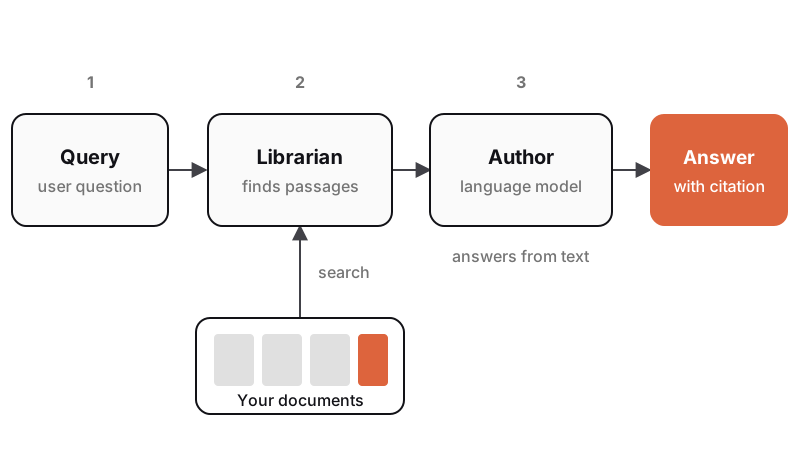
In practice, documents are first split into shorter chunks (paragraphs or sections), and each gets a numerical fingerprint of its meaning (an embedding). That lets the librarian find the right passage even when you use different wording – such as "how many vacation days do I have left" instead of "annual leave entitlement." The language model then receives the selected chunks with instructions to answer only from them and cite the source.
Patrick Lewis and colleagues introduced this method in 2020 in Retrieval-Augmented Generation for Knowledge-Intensive NLP Tasks at NeurIPS 2020. They showed that pairing a model with search yields more specific, factually accurate answers than a standalone trained model.
The advantage is that you do not need to retrain the model. Knowledge stays in your files – update a price list, re-index the file, and the assistant uses the new data right away. Retraining (fine-tuning) is slower, costlier, and cannot cite sources.
A company chatbot pays off when people ask often, phrase questions differently, and the answers sit across many documents. If the same 20 questions repeat, a well-written FAQ is cheaper and more reliable.
Ask yourself four questions before deciding:
The safest path is to deploy the assistant internally first, fix gaps in your documents, and open it to customers only once its reliability is proven.
The quality of answers from a company AI assistant depends on the quality of your files. Even the best language model cannot write a right answer from an outdated policy. Preparing documents takes more time than technical setup.
Check four things before launch:
Every document needs an owner responsible for its content. Without one, files go stale while the assistant's answers still sound convincing.
Cleaning up your files also helps staff who never use the assistant. It builds a solid base for digitalizing your company and processes.
You can only verify an AI assistant by testing it on real queries. Build a "golden set" – questions for which you already know the right answer and source file:
A simple table is enough for scoring:
| Criterion | What you check | Typical failure |
|---|---|---|
| Accuracy | Factual match with the reference answer | Old price list, wrong deadline |
| Citation | Link to the document holding the answer | Missing or unrelated source |
| "I don't know" | Refuses questions outside the documents | Invented answer |
| Clarity | Understandable without extra context | Raw pasted paragraph without explanation |
Saying "I don't know" is essential. An assistant that confidently invents answers outside your files is far riskier than one that admits it does not know and hands off to a person.
Monitor live use after launch. Thumbs-up/down ratings and unanswered queries show you each week which files to add or fix. Keep expanding your golden set with new real questions.
You can get an AI assistant at three tiers depending on data handling, setup effort, and price. The right fit depends on user count, data sensitivity, and integrations.
| Tier | Best for | Data handling | Cost |
|---|---|---|---|
| Off-the-shelf tool | Small team, dozens of files | Manual file uploads | Per-user license |
| Enterprise platform | Files in one storage system | Storage connector and permission sync | Licenses plus setup |
| Custom solution | Customer chatbot, multiple sources, custom workflows | Custom processing and system integrations | Build cost plus usage-based hosting |
Off-the-shelf tools (business ChatGPT, Microsoft 365 Copilot, Google NotebookLM) work with documents with zero development. They suit small teams and quick trials. Check the terms to confirm where data is processed and that it is not used to train models.
Enterprise platforms connect directly to your cloud storage, syncing live files and permissions. Watch your sharing settings closely – the assistant will surface a sensitive file if someone shared it company-wide by mistake.
Custom solutions make sense for public website chatbots, full data control, or connections to your e-shop, inventory, or accounting – see our guide on connecting an e-shop with accounting and inventory. You pay once for development and ongoing usage fees per query.
Pricing depends on user and query volume, document count, and connected systems. Check vendor sites for off-the-shelf rates. We build custom assistants as part of business systems from CZK 180,000 or as a web application from CZK 230,000.
A company AI assistant follows the same rules as any business software: users see only what they are cleared to see, and you know where your data lives. AI labeling and data privacy rules apply on top. This overview is not legal advice.
Access permissions. The assistant may only use files the user could open directly – a sales rep must not reach payroll data. Read more on permissions, backups, and vendors in cybersecurity for businesses.
Hidden prompts. A file or webpage may contain hidden text meant to hijack the assistant. Grant it read-only access to documents, never permission to send emails or delete data without human approval.
AI disclosure. Under Article 50 of the AI Act (from August 2, 2026), users must know they are interacting with AI unless that is obvious. In its Article 50 FAQs (from July 24, 2026), the European Commission names chatbots directly and interprets the exception narrowly. A short opening line stating an AI assistant is answering is enough. See the full text in Article 50.
Personal data. If your files contain personal data, GDPR applies. Sign a data processing agreement under Article 28 of the GDPR regulation, check the processing region, and verify your data does not train vendor models.
Pilot rollout. Start with one department and team for 4 to 6 weeks. Prepare the files, build a golden set, measure results, and gather feedback. Then review answer accuracy, time saved, and what to fix in your documents.
If you are considering a chatbot over your documents or for your customers, describe your setup in our project configurator to get an initial solution outline.
RAG (retrieval-augmented generation) is a method (Patrick Lewis et al., 2020) where a model does not rely only on its training. First it finds relevant passages in your documents, then writes an answer citing the source. You never need to retrain the model – just update your files.
It depends on the tier:
Document volume, file quality, and system integrations also shape the final cost.
Yes, provided it enforces access permissions (such as for payroll and contracts), you know where the data is hosted, you sign a data processing agreement with the vendor, and your data is never used to train external models.
Yes. Under Article 50 of the AI Act (from August 2, 2026), users must know they are dealing with AI unless it is obvious – and the European Commission interprets that exception narrowly for chatbots. State at the start of the chat that an AI assistant is replying, and offer a way to reach a person.
Handpicked topics for you
In 2026, a third of Czech firms with 10+ staff used AI. We show what pays off for small businesses, what to hold off on, and how to start without wasted spend.
Automate frequent tasks with clear rules where mistakes cost money. A two-week audit and 30 minutes of math show you where to start and what to keep manual.
Attackers need very little to breach smaller firms. Here are 10 low-cost steps and how the new Czech NIS2 law affects you, even if you are not regulated.
An AI assistant over your documents saves hours of searching when your files are in order and you verify its answers. Here is how it works and where it fails.
An AI assistant for business documents answers staff and customers from your policies, price lists, or contracts and always cites its source. It uses RAG (retrieval-augmented generation): first it finds relevant passages in your files, then a language model writes the answer. It saves hours of searching if your files are in order and you verify the answers.
According to the Czech Statistical Office, 35% of Czech firms with 10+ employees used AI in 2026 (up from 18% a year earlier), and 31% used generative AI for text, code, or voice. Read where AI pays off in Artificial intelligence in business, and how fixed rules work in business process automation.
An AI assistant quickly finds answers across hundreds of documents and explains them clearly with a source link. However, it cannot tell what is missing from your files or which file is outdated.
Where a company knowledge base chatbot typically helps:
The weak spot of language models is hallucination: if the answer is not in the files, the model may make one up. RAG cuts this risk sharply, though not to zero. Three rules help: instruct it to answer only from your files, require a source citation, and tell it to reply "I cannot find this in the documents" when the answer is missing.
Imagine the accounting firm Účty Hladce with procedures spread across 50 files. A new colleague asks for a client's tax filing deadline. The assistant finds the policy paragraph, replies in one sentence, and adds a link. If nobody updated last year's policy, though, it will confidently quote the old rule.
Numbers that change every minute – stock levels, orders, or account balances – do not belong in static files either. The assistant should pull those directly from your system via an API, or point the user there. Language models also cannot calculate reliably, so leave spreadsheet math to standard software and let the assistant only explain the result.
A document chatbot works in two steps, like a librarian and an author. The librarian finds the relevant pages in your files. The author reads them, writes the answer, and cites the source.
In practice, documents are first split into shorter chunks (paragraphs or sections), and each gets a numerical fingerprint of its meaning (an embedding). That lets the librarian find the right passage even when you use different wording – such as "how many vacation days do I have left" instead of "annual leave entitlement." The language model then receives the selected chunks with instructions to answer only from them and cite the source.
Patrick Lewis and colleagues introduced this method in 2020 in Retrieval-Augmented Generation for Knowledge-Intensive NLP Tasks at NeurIPS 2020. They showed that pairing a model with search yields more specific, factually accurate answers than a standalone trained model.
The advantage is that you do not need to retrain the model. Knowledge stays in your files – update a price list, re-index the file, and the assistant uses the new data right away. Retraining (fine-tuning) is slower, costlier, and cannot cite sources.
A company chatbot pays off when people ask often, phrase questions differently, and the answers sit across many documents. If the same 20 questions repeat, a well-written FAQ is cheaper and more reliable.
Ask yourself four questions before deciding:
The safest path is to deploy the assistant internally first, fix gaps in your documents, and open it to customers only once its reliability is proven.
The quality of answers from a company AI assistant depends on the quality of your files. Even the best language model cannot write a right answer from an outdated policy. Preparing documents takes more time than technical setup.
Check four things before launch:
Every document needs an owner responsible for its content. Without one, files go stale while the assistant's answers still sound convincing.
Cleaning up your files also helps staff who never use the assistant. It builds a solid base for digitalizing your company and processes.
You can only verify an AI assistant by testing it on real queries. Build a "golden set" – questions for which you already know the right answer and source file:
A simple table is enough for scoring:
| Criterion | What you check | Typical failure |
|---|---|---|
| Accuracy | Factual match with the reference answer | Old price list, wrong deadline |
| Citation | Link to the document holding the answer | Missing or unrelated source |
| "I don't know" | Refuses questions outside the documents | Invented answer |
| Clarity | Understandable without extra context | Raw pasted paragraph without explanation |
Saying "I don't know" is essential. An assistant that confidently invents answers outside your files is far riskier than one that admits it does not know and hands off to a person.
Monitor live use after launch. Thumbs-up/down ratings and unanswered queries show you each week which files to add or fix. Keep expanding your golden set with new real questions.
You can get an AI assistant at three tiers depending on data handling, setup effort, and price. The right fit depends on user count, data sensitivity, and integrations.
| Tier | Best for | Data handling | Cost |
|---|---|---|---|
| Off-the-shelf tool | Small team, dozens of files | Manual file uploads | Per-user license |
| Enterprise platform | Files in one storage system | Storage connector and permission sync | Licenses plus setup |
| Custom solution | Customer chatbot, multiple sources, custom workflows | Custom processing and system integrations | Build cost plus usage-based hosting |
Off-the-shelf tools (business ChatGPT, Microsoft 365 Copilot, Google NotebookLM) work with documents with zero development. They suit small teams and quick trials. Check the terms to confirm where data is processed and that it is not used to train models.
Enterprise platforms connect directly to your cloud storage, syncing live files and permissions. Watch your sharing settings closely – the assistant will surface a sensitive file if someone shared it company-wide by mistake.
Custom solutions make sense for public website chatbots, full data control, or connections to your e-shop, inventory, or accounting – see our guide on connecting an e-shop with accounting and inventory. You pay once for development and ongoing usage fees per query.
Pricing depends on user and query volume, document count, and connected systems. Check vendor sites for off-the-shelf rates. We build custom assistants as part of business systems from CZK 180,000 or as a web application from CZK 230,000.
A company AI assistant follows the same rules as any business software: users see only what they are cleared to see, and you know where your data lives. AI labeling and data privacy rules apply on top. This overview is not legal advice.
Access permissions. The assistant may only use files the user could open directly – a sales rep must not reach payroll data. Read more on permissions, backups, and vendors in cybersecurity for businesses.
Hidden prompts. A file or webpage may contain hidden text meant to hijack the assistant. Grant it read-only access to documents, never permission to send emails or delete data without human approval.
AI disclosure. Under Article 50 of the AI Act (from August 2, 2026), users must know they are interacting with AI unless that is obvious. In its Article 50 FAQs (from July 24, 2026), the European Commission names chatbots directly and interprets the exception narrowly. A short opening line stating an AI assistant is answering is enough. See the full text in Article 50.
Personal data. If your files contain personal data, GDPR applies. Sign a data processing agreement under Article 28 of the GDPR regulation, check the processing region, and verify your data does not train vendor models.
Pilot rollout. Start with one department and team for 4 to 6 weeks. Prepare the files, build a golden set, measure results, and gather feedback. Then review answer accuracy, time saved, and what to fix in your documents.
If you are considering a chatbot over your documents or for your customers, describe your setup in our project configurator to get an initial solution outline.
RAG (retrieval-augmented generation) is a method (Patrick Lewis et al., 2020) where a model does not rely only on its training. First it finds relevant passages in your documents, then writes an answer citing the source. You never need to retrain the model – just update your files.
It depends on the tier:
Document volume, file quality, and system integrations also shape the final cost.
Yes, provided it enforces access permissions (such as for payroll and contracts), you know where the data is hosted, you sign a data processing agreement with the vendor, and your data is never used to train external models.
Yes. Under Article 50 of the AI Act (from August 2, 2026), users must know they are dealing with AI unless it is obvious – and the European Commission interprets that exception narrowly for chatbots. State at the start of the chat that an AI assistant is replying, and offer a way to reach a person.
Handpicked topics for you
In 2026, a third of Czech firms with 10+ staff used AI. We show what pays off for small businesses, what to hold off on, and how to start without wasted spend.
Automate frequent tasks with clear rules where mistakes cost money. A two-week audit and 30 minutes of math show you where to start and what to keep manual.
Attackers need very little to breach smaller firms. Here are 10 low-cost steps and how the new Czech NIS2 law affects you, even if you are not regulated.