E-commerce accounting integration: a guide for stores
Typing orders into accounting by hand wastes time and breeds errors. See how to connect your systems, when a plugin is enough, and what to avoid.
Business buyers want consumer-grade convenience: ordering anytime, by SKU, at contract prices. A B2B portal lets wholesalers serve more accounts without adding phone staff.
A B2B ordering portal is an online self-service system for business buyers. Customers place orders themselves—anytime, by SKU, at their contract prices, with all documents in one place. Wholesalers, distributors, and manufacturers build a self-service portal for distributors and trade accounts to serve more buyers without adding phone staff or retyping emailed orders.
Below, we explain what a B2B portal needs beyond a standard online store, how to connect it to your ERP and warehouse, how Czech and EU VAT rules apply, how it changes your sales team's work, and how to roll it out in phases.
Business buyers prefer ordering online because it saves time and cuts errors. Purchasing managers and site foremen are used to seeing live prices and stock in consumer stores, ordering in the evening, and tracking parcels. With suppliers, they often hit a busy phone line or wait until the next day for a reply.
Online ordering gives buyers clear benefits:
For wholesalers, manual retyping, errors, and calls about stock or shipments disappear. Sales reps gain time to grow accounts.
Picture a fictional fastener wholesaler serving hundreds of tradespeople. Most orders contain dozens of SKUs and arrive by email or phone. Assistants retype them and check contract prices manually, causing mistakes. Here, a B2B portal pays off fastest. Personal contact stays: reps still handle large deals and negotiations, while the portal takes over routine orders.
Unlike a retail store, a B2B portal handles unique terms for every buyer. A consumer shop shows one price to everyone and takes upfront payment; a B2B portal must know each company's contract, discounts, payment terms, and limits. Here is how they compare:
| Area | B2C online store | B2B portal |
|---|---|---|
| Pricing | one price for all | custom price lists and discounts |
| Payment | upfront by card or transfer | on invoice with a credit limit |
| Ordering | browsing a catalog | by SKU and repeat orders |
| Users | single shopper | multiple company users with roles |
| Documents | email confirmation | invoices, delivery notes, history |
| VAT | VAT-inclusive prices | ex-VAT prices, buyer-specific tax rules |
| Quantities | single items | packs, minimum order quantities |
In practice, the portal must pull price lists, unpaid invoices, and credit limits straight from your ERP. Multi-user accounts let a warehouse clerk draft an order and a manager approve it.
The catalog differs too. Buyers search by SKU, technical specs, or manufacturer part number. Goods sell in packs, cartons, or pallets, with minimum order quantities and volume tiers. The portal must convert units and match what the warehouse actually ships.
Hiding prices behind a login on a retail store is not enough; a B2B portal is a client zone built over your ERP. Many platforms do offer B2B modules—we cover how to choose in E-commerce platforms.
Your portal does not need every feature on day one. Split features into essentials, useful additions, and phase-two upgrades:
Your buyers know best what is essential: ask five of them what slows them down most.
Quick ordering by SKU (such as pasting rows copied from a spreadsheet) and one-click reordering save the most work. Along with parcel tracking, both must work smoothly on mobile for site foremen and field technicians.
Do not overlook documents. When a buyer's accountant finds invoices, delivery notes, and open balances in the portal, you field fewer calls and send fewer payment reminders.
Your ERP (business or accounting system with inventory) remains the single source of truth for prices, limits, stock, and documents. The B2B portal reads this data and writes orders back. Separate price lists or stock records in the portal would soon drift out of sync, showing buyers one price online and another on the invoice.
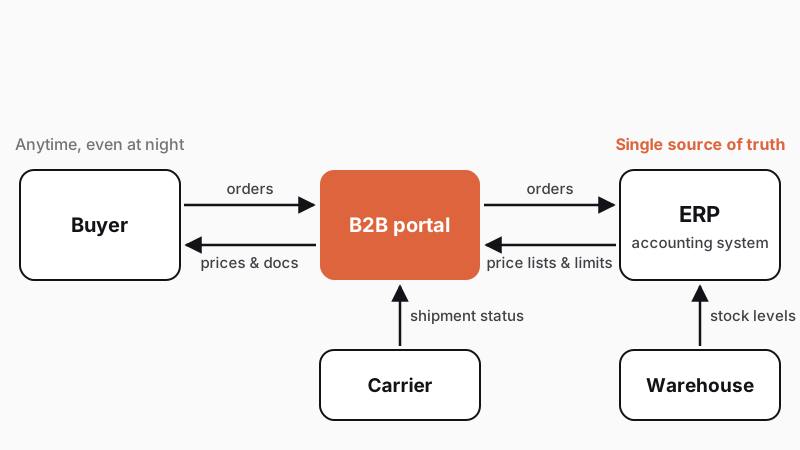
Sync frequency depends on how fast each data type changes:
Czech systems like Pohoda, Money, and ABRA include data exchange interfaces. Pohoda, for instance, exchanges orders, invoices, and stock in XML via files or its mServer HTTP interface (Stormware XML documentation). Verify interface capabilities and speed early in the project, as they affect design and cost. Read more in Connecting your online store to accounting.
If your ERP lacks an interface, you have three options (choose during initial discovery, as costs and risks vary):
Connections occasionally fail due to an ERP update, server downtime, or an unknown SKU in an order. A solid portal holds the order, alerts staff, and retries the transfer. Ask vendors about this just as closely as visual design.
A B2B portal in Czechia must handle buyer verification and VAT rules. This text does not replace tax advice; review your setup with a tax advisor.
ARES. In Czechia, the ARES API is free and requires no registration. It loads a company's name and address by ID (IČO) and monitors later changes.
VIES. For EU cross-border B2B supplies (in Czechia under Section 64 of Act No. 235/2004 Coll., as of January 1, 2026), shipping goods to a VAT-registered buyer in another EU state is VAT-exempt when the buyer provides a VAT ID, the goods are transported there, and you report the sale in your EC Sales List. The portal verifies the VAT ID via the European Commission's VIES API at registration and sets the VAT regime automatically. VIES checks only the validity of the VAT ID, never the VAT rate.
Domestic reverse charge. Under the EU reverse-charge mechanism (implemented locally in Section 92a et seq.), a VAT-registered buyer acting as a taxable person accounts for the VAT. In Czechia, this applies to gold, waste and scrap (Annex 5), construction and assembly work, or goods in Annex 6 per government decree. Both the portal and your ERP must issue compliant documents.
Cross-border sales. Plan for multiple languages from day one, and pull EUR price lists from your ERP just like CZK ones.
Pricing and documents. Show ex-VAT prices primarily and calculate tax based on the buyer. Issue statutory invoices directly in your ERP to keep one numbering sequence.
Shipping. Offer your own fleet, local pickup, or carriers, and pull shipment status automatically.
Sales reps spend less time retyping orders and more time caring for accounts—such as calling a buyer whose purchases dipped or pitching a new product.
Still, reps may fear losing jobs or commissions when buyers self-serve. Resolve this before launch, because your reps decide whether customers adopt the portal:
After a few months, compare time spent retyping versus serving clients and discuss the results with your reps. The portal takes over routine admin, not their jobs.
An off-the-shelf platform is enough for simple price lists, fewer buyers, and standard ERPs. A custom B2B portal pays off with complex pricing, large catalogs, approval workflows, or custom ERP integration. Read more in Custom software vs. off-the-shelf systems.
Roll the portal out in phases:
Invite buyers personally via sales reps and by email. Include a guide and offer to walk through their first order together. Keep old channels open at first, while highlighting the portal's benefits: document access, live stock, history, and faster fulfillment.
In distribution, we created GPD B2B (a tire supplier website) and Tyreto (an online tire store). Find more examples in our projects.
We build B2B portals as a custom web application from CZK 230,000. If extending an online shop is enough, an online store starts from CZK 140,000.
Try our project configurator—it turns your answers into a project brief and three solution options.
It is an online ordering system for business buyers, used mainly by wholesalers, distributors, and manufacturers. After logging in, a buyer sees contract prices, stock levels, order history, and documents (invoices, delivery notes), and orders by SKU. This wholesale portal pulls price lists, limits, and documents from the supplier's ERP and sends orders back.
A B2C store sells to consumers at uniform prices with upfront payment. A B2B portal offers custom price lists, invoice billing with payment terms, credit limits, multiple user accounts per company, and ordering by SKU. It shows ex-VAT prices and sets the tax regime by buyer, such as for cross-border EU supplies.
They connect through the ERP's interface, such as XML or a web API. The portal pulls price lists, limits, stock levels, and documents from the ERP and sends back orders. Sync frequency depends on how fast the data changes. A good integration catches errors, alerts staff, and retries the transfer.
The price depends on feature count, pricing complexity, and ERP integration effort. With us, a simpler online store starts from CZK 140,000, and a custom web application from CZK 230,000. An initial discovery analysis provides a closer estimate.
Handpicked topics for you
Typing orders into accounting by hand wastes time and breeds errors. See how to connect your systems, when a plugin is enough, and what to avoid.
Off-the-shelf software covers most daily work. Build custom only what sets you apart. Use our quick test, see where no-code hits its ceiling, and compare five-year costs.
Most new online stores only need a hosted platform. Learn how to spot when you outgrow it and when custom e-commerce is an unnecessary expense.
Business buyers want consumer-grade convenience: ordering anytime, by SKU, at contract prices. A B2B portal lets wholesalers serve more accounts without adding phone staff.
A B2B ordering portal is an online self-service system for business buyers. Customers place orders themselves—anytime, by SKU, at their contract prices, with all documents in one place. Wholesalers, distributors, and manufacturers build a self-service portal for distributors and trade accounts to serve more buyers without adding phone staff or retyping emailed orders.
Below, we explain what a B2B portal needs beyond a standard online store, how to connect it to your ERP and warehouse, how Czech and EU VAT rules apply, how it changes your sales team's work, and how to roll it out in phases.
Business buyers prefer ordering online because it saves time and cuts errors. Purchasing managers and site foremen are used to seeing live prices and stock in consumer stores, ordering in the evening, and tracking parcels. With suppliers, they often hit a busy phone line or wait until the next day for a reply.
Online ordering gives buyers clear benefits:
For wholesalers, manual retyping, errors, and calls about stock or shipments disappear. Sales reps gain time to grow accounts.
Picture a fictional fastener wholesaler serving hundreds of tradespeople. Most orders contain dozens of SKUs and arrive by email or phone. Assistants retype them and check contract prices manually, causing mistakes. Here, a B2B portal pays off fastest. Personal contact stays: reps still handle large deals and negotiations, while the portal takes over routine orders.
Unlike a retail store, a B2B portal handles unique terms for every buyer. A consumer shop shows one price to everyone and takes upfront payment; a B2B portal must know each company's contract, discounts, payment terms, and limits. Here is how they compare:
| Area | B2C online store | B2B portal |
|---|---|---|
| Pricing | one price for all | custom price lists and discounts |
| Payment | upfront by card or transfer | on invoice with a credit limit |
| Ordering | browsing a catalog | by SKU and repeat orders |
| Users | single shopper | multiple company users with roles |
| Documents | email confirmation | invoices, delivery notes, history |
| VAT | VAT-inclusive prices | ex-VAT prices, buyer-specific tax rules |
| Quantities | single items | packs, minimum order quantities |
In practice, the portal must pull price lists, unpaid invoices, and credit limits straight from your ERP. Multi-user accounts let a warehouse clerk draft an order and a manager approve it.
The catalog differs too. Buyers search by SKU, technical specs, or manufacturer part number. Goods sell in packs, cartons, or pallets, with minimum order quantities and volume tiers. The portal must convert units and match what the warehouse actually ships.
Hiding prices behind a login on a retail store is not enough; a B2B portal is a client zone built over your ERP. Many platforms do offer B2B modules—we cover how to choose in E-commerce platforms.
Your portal does not need every feature on day one. Split features into essentials, useful additions, and phase-two upgrades:
Your buyers know best what is essential: ask five of them what slows them down most.
Quick ordering by SKU (such as pasting rows copied from a spreadsheet) and one-click reordering save the most work. Along with parcel tracking, both must work smoothly on mobile for site foremen and field technicians.
Do not overlook documents. When a buyer's accountant finds invoices, delivery notes, and open balances in the portal, you field fewer calls and send fewer payment reminders.
Your ERP (business or accounting system with inventory) remains the single source of truth for prices, limits, stock, and documents. The B2B portal reads this data and writes orders back. Separate price lists or stock records in the portal would soon drift out of sync, showing buyers one price online and another on the invoice.
Sync frequency depends on how fast each data type changes:
Czech systems like Pohoda, Money, and ABRA include data exchange interfaces. Pohoda, for instance, exchanges orders, invoices, and stock in XML via files or its mServer HTTP interface (Stormware XML documentation). Verify interface capabilities and speed early in the project, as they affect design and cost. Read more in Connecting your online store to accounting.
If your ERP lacks an interface, you have three options (choose during initial discovery, as costs and risks vary):
Connections occasionally fail due to an ERP update, server downtime, or an unknown SKU in an order. A solid portal holds the order, alerts staff, and retries the transfer. Ask vendors about this just as closely as visual design.
A B2B portal in Czechia must handle buyer verification and VAT rules. This text does not replace tax advice; review your setup with a tax advisor.
ARES. In Czechia, the ARES API is free and requires no registration. It loads a company's name and address by ID (IČO) and monitors later changes.
VIES. For EU cross-border B2B supplies (in Czechia under Section 64 of Act No. 235/2004 Coll., as of January 1, 2026), shipping goods to a VAT-registered buyer in another EU state is VAT-exempt when the buyer provides a VAT ID, the goods are transported there, and you report the sale in your EC Sales List. The portal verifies the VAT ID via the European Commission's VIES API at registration and sets the VAT regime automatically. VIES checks only the validity of the VAT ID, never the VAT rate.
Domestic reverse charge. Under the EU reverse-charge mechanism (implemented locally in Section 92a et seq.), a VAT-registered buyer acting as a taxable person accounts for the VAT. In Czechia, this applies to gold, waste and scrap (Annex 5), construction and assembly work, or goods in Annex 6 per government decree. Both the portal and your ERP must issue compliant documents.
Cross-border sales. Plan for multiple languages from day one, and pull EUR price lists from your ERP just like CZK ones.
Pricing and documents. Show ex-VAT prices primarily and calculate tax based on the buyer. Issue statutory invoices directly in your ERP to keep one numbering sequence.
Shipping. Offer your own fleet, local pickup, or carriers, and pull shipment status automatically.
Sales reps spend less time retyping orders and more time caring for accounts—such as calling a buyer whose purchases dipped or pitching a new product.
Still, reps may fear losing jobs or commissions when buyers self-serve. Resolve this before launch, because your reps decide whether customers adopt the portal:
After a few months, compare time spent retyping versus serving clients and discuss the results with your reps. The portal takes over routine admin, not their jobs.
An off-the-shelf platform is enough for simple price lists, fewer buyers, and standard ERPs. A custom B2B portal pays off with complex pricing, large catalogs, approval workflows, or custom ERP integration. Read more in Custom software vs. off-the-shelf systems.
Roll the portal out in phases:
Invite buyers personally via sales reps and by email. Include a guide and offer to walk through their first order together. Keep old channels open at first, while highlighting the portal's benefits: document access, live stock, history, and faster fulfillment.
In distribution, we created GPD B2B (a tire supplier website) and Tyreto (an online tire store). Find more examples in our projects.
We build B2B portals as a custom web application from CZK 230,000. If extending an online shop is enough, an online store starts from CZK 140,000.
Try our project configurator—it turns your answers into a project brief and three solution options.
It is an online ordering system for business buyers, used mainly by wholesalers, distributors, and manufacturers. After logging in, a buyer sees contract prices, stock levels, order history, and documents (invoices, delivery notes), and orders by SKU. This wholesale portal pulls price lists, limits, and documents from the supplier's ERP and sends orders back.
A B2C store sells to consumers at uniform prices with upfront payment. A B2B portal offers custom price lists, invoice billing with payment terms, credit limits, multiple user accounts per company, and ordering by SKU. It shows ex-VAT prices and sets the tax regime by buyer, such as for cross-border EU supplies.
They connect through the ERP's interface, such as XML or a web API. The portal pulls price lists, limits, stock levels, and documents from the ERP and sends back orders. Sync frequency depends on how fast the data changes. A good integration catches errors, alerts staff, and retries the transfer.
The price depends on feature count, pricing complexity, and ERP integration effort. With us, a simpler online store starts from CZK 140,000, and a custom web application from CZK 230,000. An initial discovery analysis provides a closer estimate.
Handpicked topics for you
Typing orders into accounting by hand wastes time and breeds errors. See how to connect your systems, when a plugin is enough, and what to avoid.
Off-the-shelf software covers most daily work. Build custom only what sets you apart. Use our quick test, see where no-code hits its ceiling, and compare five-year costs.
Most new online stores only need a hosted platform. Learn how to spot when you outgrow it and when custom e-commerce is an unnecessary expense.