Choosing an e-commerce platform: Shopify, Shoptet or custom
Most new online stores only need a hosted platform. Learn how to spot when you outgrow it and when custom e-commerce is an unnecessary expense.
Translating into English alone won't win foreign clients. Localization, URL structure, and hreflang decide. See what we learned launching our site in 3 languages.

A multilingual website brings in foreign customers only when you build each version for people in the target country—with their language, currency, contact details, and the words they actually search for. For search engines, every version needs its own URL and hreflang tags so Google shows visitors the right one.
Here we explain how translation differs from localization, how to choose URLs for language versions, how hreflang works, and where AI website translation is enough. We also share what we learned launching our own website in Czech, English, and Japanese.
Language shapes both trust and sales. A 2020 CSA Research study surveyed 8,709 consumers across 29 countries. According to Can't Read, Won't Buy, 76% of online shoppers prefer information in their native language, and 40% never buy from foreign-language sites at all.
Take Czech businesses as an example of the gap. According to 2025 Czech Statistical Office data, 34% of companies with ten or more employees had a foreign-language website (68% of large firms, just 27% of small ones). English leads (38% of businesses with a website), followed by German (15%).
That creates an opportunity for exporters and online stores, provided a real offer backs it up. If you cannot reply in English or do not ship abroad, start with a smaller version that honestly states what you offer.
Which languages should you pick? Start with data: Google Analytics shows where visitors come from, and Search Console shows where you appear in search. Add foreign inquiries and target markets. Most companies do best starting with one language for their main market and adding others based on results, rather than launching five at once.
Translation converts text into another language; localization adapts a website to the habits of the target country. It includes:
You do not translate keywords—you research them from scratch in each language. British shoppers search for "mobile phone," Americans for "cell phone." Before translating your site, check how people search for your products and adapt headings, titles, and meta descriptions.
Tone gets localized too: Czech uses formal address, Japanese relies on polite forms, and English tends to be more concise. A skilled translator or well-prompted AI will keep that consistent.
Picture a fictional carpentry shop in South Moravia selling kitchens to Austria. Translating the catalog is not enough. Buyers expect prices including delivery and installation in Austria, dimensions in centimeters, local references, a German-speaking contact, and Austrian German—such as "Jänner" instead of "Januar" for January.
For most small and mid-sized businesses, a subfolder on the same domain—such as firma.cz/en/—is the simplest setup. Google's guide to multilingual sites outlines four options.
| Option | Example | Pros | Cons |
|---|---|---|---|
| Subfolder | firma.cz/en/ | easy setup, lowest maintenance, single site | weaker signal of which country it targets |
| Subdomain | en.firma.cz | easy separation, can use a different server | unclear whether "en" marks language or country |
| Country domain | firma.de | clearest signal for a single country | highest cost and maintenance, domain may be taken |
| URL parameter | firma.cz?lang=en | none | not recommended by Google |
A subfolder fits when one team runs the site—it shares domain authority, so you do not start from scratch. A subdomain makes sense when another team manages the version or it runs on a separate system. Companies with a local branch, warehouse, or sales team choose country domains, though each domain is a standalone site needing its own content, backlinks, and upkeep.
Follow one rule: give the same page a consistent URL structure everywhere (for instance, /sluzby and /en/sluzby). That simplifies management and lets the language switcher link to the matching subpage rather than the homepage.
Decide on URLs upfront. Moving later means changing addresses, setting up redirects, and facing temporary ranking swings. Pick a structure that will still work five years from now.
Hreflang is a code tag that tells search engines which language versions a page has and whom they target. Like a signpost, it points to the Czech, English, or Japanese version so Google offers visitors their language.
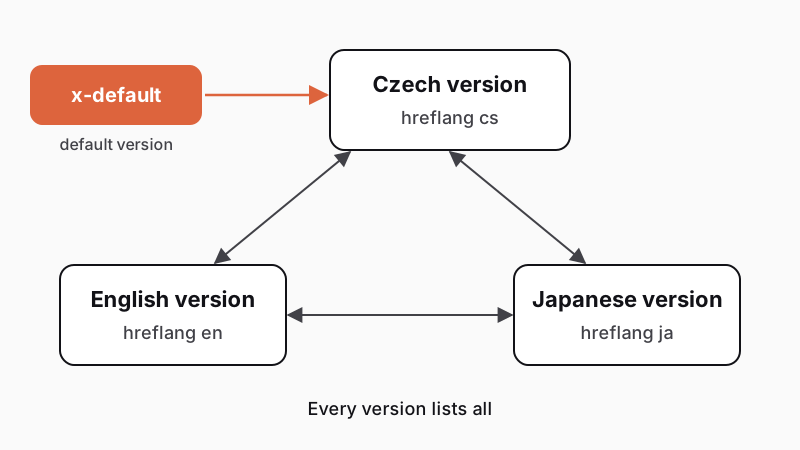
According to Google's documentation, five rules apply:
Google detects language from visible text, not code or URLs. If you only translate the menu, Google will not treat the page as English.
Check hreflang in the page source: every version must link to the others and to itself. Dedicated audit tools can scan larger sites. The most common mistakes are typos in codes, broken URLs, and one-way links.
Google advises against automatic redirects or swapping content by IP address—neither users nor crawlers can then reach every version. Suggest a language from browser settings or location only on arrival, keep a visible switcher, save the user's choice, and serve crawlers each version on its own URL.
Selling to consumers in other EU countries also involves taxes, payments, and shipping. Since July 1, 2021, an annual EU distance-selling threshold of EUR 10,000 (excluding VAT) applies: below it you charge your home country's VAT, above it the buyer's country's VAT. The One Stop Shop (OSS) spares you registering in every member state—you file one quarterly return at home and taxes get distributed. Above the threshold your store charges foreign VAT, so review taxes, pricing, and invoicing with your accountant before launch.
Verify local payment methods and carriers too, and adapt your checkout. Our guide on choosing an e-commerce platform helps you pick a system for multiple currencies, languages, and tax rates.
Do not rely purely on machine translation for terms and conditions, withdrawal rights, and returns—have a local legal specialist review them. If you are planning a multilingual online store, factor this in from day one.
AI and language models handle first-pass website translation, product descriptions, and quick edits far better than older tools, yet they fall short on sales pages by themselves.
Google does not penalize machine translation. Its spam policies target mass-generated pages scraped from other sources without added value—usefulness is what counts.
A human should always review:
Give translators and AI tools a brand glossary: what stays untranslated (company and product names) and what uses fixed terms. For Japanese, Chinese, or Korean, involve a native speaker to check politeness levels and subtle errors.
Test the layout on mobile and desktop: long German words break buttons and headings, while Japanese has no spaces and wraps differently.
Assign an owner for each language version and define how updates from your primary language get synced and reviewed, so outdated prices never linger. On larger sites, a system that flags stale translations helps.
Since November 13, 2026, guapmedia.cz has run in Czech on the root domain, plus English (/en/) and Japanese (/ja/).
We will share Search Console data once enough accumulates. Before launch, beyond reviewing translations, we checked longer English and Japanese button labels, mobile line breaks, and internal links to make sure they stay in the same language.
Related guides and case studies:
Planning to add a language to your site? Try our project configurator or explore our business websites.
Pick your target markets and research local keywords. Choose a URL structure (subfolders like /en/ suit most smaller businesses) and set up hreflang. Localize the content: currency, contacts, examples, and legal copy. AI translation is a good start, but have a human review key pages.
For small and mid-sized businesses, a subfolder (e.g., firma.cz/en/) works better: it is easy to set up and maintain, and it shares domain authority. A subdomain fits a separate team or platform. Choose a country domain (.de) when you have a local branch and want a local presence.
For a first draft and high-volume copy, yes; for sales pages, no. Google does not penalize machine translation—quality and usefulness decide. A native speaker or editor should review your homepage, services, pricing, taglines, and legal texts. A glossary of non-translatable terms helps.
Hreflang is a code tag that tells search engines which language versions a page has and whom they target. You need it whenever you publish the same content in multiple languages. Every version must list itself and all others, or Google ignores it. The x-default tag sets the fallback version for other languages.
Cost depends on text volume, number of languages, site type (a brochure site vs. an online store with pricing, taxes, and shipping), and the share of human review. Localization and quality checks take the most effort. You can get an estimate in our project configurator.
Handpicked topics for you
Most new online stores only need a hosted platform. Learn how to spot when you outgrow it and when custom e-commerce is an unnecessary expense.
A new website can lose years of search traffic, usually from missed redirects. Here is how to prevent that, including lessons from our own redesign.
Read our tips on boosting your search rankings and winning new customers for free
Translating into English alone won't win foreign clients. Localization, URL structure, and hreflang decide. See what we learned launching our site in 3 languages.
A multilingual website brings in foreign customers only when you build each version for people in the target country—with their language, currency, contact details, and the words they actually search for. For search engines, every version needs its own URL and hreflang tags so Google shows visitors the right one.
Here we explain how translation differs from localization, how to choose URLs for language versions, how hreflang works, and where AI website translation is enough. We also share what we learned launching our own website in Czech, English, and Japanese.
Language shapes both trust and sales. A 2020 CSA Research study surveyed 8,709 consumers across 29 countries. According to Can't Read, Won't Buy, 76% of online shoppers prefer information in their native language, and 40% never buy from foreign-language sites at all.
Take Czech businesses as an example of the gap. According to 2025 Czech Statistical Office data, 34% of companies with ten or more employees had a foreign-language website (68% of large firms, just 27% of small ones). English leads (38% of businesses with a website), followed by German (15%).
That creates an opportunity for exporters and online stores, provided a real offer backs it up. If you cannot reply in English or do not ship abroad, start with a smaller version that honestly states what you offer.
Which languages should you pick? Start with data: Google Analytics shows where visitors come from, and Search Console shows where you appear in search. Add foreign inquiries and target markets. Most companies do best starting with one language for their main market and adding others based on results, rather than launching five at once.
Translation converts text into another language; localization adapts a website to the habits of the target country. It includes:
You do not translate keywords—you research them from scratch in each language. British shoppers search for "mobile phone," Americans for "cell phone." Before translating your site, check how people search for your products and adapt headings, titles, and meta descriptions.
Tone gets localized too: Czech uses formal address, Japanese relies on polite forms, and English tends to be more concise. A skilled translator or well-prompted AI will keep that consistent.
Picture a fictional carpentry shop in South Moravia selling kitchens to Austria. Translating the catalog is not enough. Buyers expect prices including delivery and installation in Austria, dimensions in centimeters, local references, a German-speaking contact, and Austrian German—such as "Jänner" instead of "Januar" for January.
For most small and mid-sized businesses, a subfolder on the same domain—such as firma.cz/en/—is the simplest setup. Google's guide to multilingual sites outlines four options.
| Option | Example | Pros | Cons |
|---|---|---|---|
| Subfolder | firma.cz/en/ | easy setup, lowest maintenance, single site | weaker signal of which country it targets |
| Subdomain | en.firma.cz | easy separation, can use a different server | unclear whether "en" marks language or country |
| Country domain | firma.de | clearest signal for a single country | highest cost and maintenance, domain may be taken |
| URL parameter | firma.cz?lang=en | none | not recommended by Google |
A subfolder fits when one team runs the site—it shares domain authority, so you do not start from scratch. A subdomain makes sense when another team manages the version or it runs on a separate system. Companies with a local branch, warehouse, or sales team choose country domains, though each domain is a standalone site needing its own content, backlinks, and upkeep.
Follow one rule: give the same page a consistent URL structure everywhere (for instance, /sluzby and /en/sluzby). That simplifies management and lets the language switcher link to the matching subpage rather than the homepage.
Decide on URLs upfront. Moving later means changing addresses, setting up redirects, and facing temporary ranking swings. Pick a structure that will still work five years from now.
Hreflang is a code tag that tells search engines which language versions a page has and whom they target. Like a signpost, it points to the Czech, English, or Japanese version so Google offers visitors their language.
According to Google's documentation, five rules apply:
Google detects language from visible text, not code or URLs. If you only translate the menu, Google will not treat the page as English.
Check hreflang in the page source: every version must link to the others and to itself. Dedicated audit tools can scan larger sites. The most common mistakes are typos in codes, broken URLs, and one-way links.
Google advises against automatic redirects or swapping content by IP address—neither users nor crawlers can then reach every version. Suggest a language from browser settings or location only on arrival, keep a visible switcher, save the user's choice, and serve crawlers each version on its own URL.
Selling to consumers in other EU countries also involves taxes, payments, and shipping. Since July 1, 2021, an annual EU distance-selling threshold of EUR 10,000 (excluding VAT) applies: below it you charge your home country's VAT, above it the buyer's country's VAT. The One Stop Shop (OSS) spares you registering in every member state—you file one quarterly return at home and taxes get distributed. Above the threshold your store charges foreign VAT, so review taxes, pricing, and invoicing with your accountant before launch.
Verify local payment methods and carriers too, and adapt your checkout. Our guide on choosing an e-commerce platform helps you pick a system for multiple currencies, languages, and tax rates.
Do not rely purely on machine translation for terms and conditions, withdrawal rights, and returns—have a local legal specialist review them. If you are planning a multilingual online store, factor this in from day one.
AI and language models handle first-pass website translation, product descriptions, and quick edits far better than older tools, yet they fall short on sales pages by themselves.
Google does not penalize machine translation. Its spam policies target mass-generated pages scraped from other sources without added value—usefulness is what counts.
A human should always review:
Give translators and AI tools a brand glossary: what stays untranslated (company and product names) and what uses fixed terms. For Japanese, Chinese, or Korean, involve a native speaker to check politeness levels and subtle errors.
Test the layout on mobile and desktop: long German words break buttons and headings, while Japanese has no spaces and wraps differently.
Assign an owner for each language version and define how updates from your primary language get synced and reviewed, so outdated prices never linger. On larger sites, a system that flags stale translations helps.
Since November 13, 2026, guapmedia.cz has run in Czech on the root domain, plus English (/en/) and Japanese (/ja/).
We will share Search Console data once enough accumulates. Before launch, beyond reviewing translations, we checked longer English and Japanese button labels, mobile line breaks, and internal links to make sure they stay in the same language.
Related guides and case studies:
Planning to add a language to your site? Try our project configurator or explore our business websites.
Pick your target markets and research local keywords. Choose a URL structure (subfolders like /en/ suit most smaller businesses) and set up hreflang. Localize the content: currency, contacts, examples, and legal copy. AI translation is a good start, but have a human review key pages.
For small and mid-sized businesses, a subfolder (e.g., firma.cz/en/) works better: it is easy to set up and maintain, and it shares domain authority. A subdomain fits a separate team or platform. Choose a country domain (.de) when you have a local branch and want a local presence.
For a first draft and high-volume copy, yes; for sales pages, no. Google does not penalize machine translation—quality and usefulness decide. A native speaker or editor should review your homepage, services, pricing, taglines, and legal texts. A glossary of non-translatable terms helps.
Hreflang is a code tag that tells search engines which language versions a page has and whom they target. You need it whenever you publish the same content in multiple languages. Every version must list itself and all others, or Google ignores it. The x-default tag sets the fallback version for other languages.
Cost depends on text volume, number of languages, site type (a brochure site vs. an online store with pricing, taxes, and shipping), and the share of human review. Localization and quality checks take the most effort. You can get an estimate in our project configurator.
Handpicked topics for you
Most new online stores only need a hosted platform. Learn how to spot when you outgrow it and when custom e-commerce is an unnecessary expense.
A new website can lose years of search traffic, usually from missed redirects. Here is how to prevent that, including lessons from our own redesign.
Read our tips on boosting your search rankings and winning new customers for free