How much does a website cost: build and 3-year costs
A website can cost a few thousand or hundreds of thousands of CZK—and both make sense. See what drives the price, what three years of operation cost, and what to ask vendors.
A new website can lose years of search traffic, usually from missed redirects. Here is how to prevent that, including lessons from our own redesign.

A website redesign doesn't have to cost you search traffic. Permanently redirect every old URL that brought visits or backlinks to its matching new page, and follow a checklist on launch day. Where website redesign and SEO clash, the culprit is usually forgotten redirects, not the new look.
Here we walk through the full process: choosing between a redesign and gradual updates, auditing before the first mockup, setting up 301 redirects, and knowing what to check on launch day and in the weeks after. We also show how we handled our own redesign in November 2026.
A full overhaul pays off only when gradual updates stop helping. In a 2015 article on radical vs. incremental redesign, consultancy Nielsen Norman Group advises against radical changes where smaller steps will do. Visitors get used to a site, and a major change forces them to relearn how to use it.
According to the authors, a full redesign makes sense when small tweaks and repeated fixes fail to lift conversions, outdated tech blocks important changes, the site structure has grown tangled, or competitors serve customers demonstrably better.
For smaller businesses, five signs stand out:
It is like a house: sometimes a coat of paint is enough; other times you have to replace old wiring and foundations. Even in a major renovation, you don't tear down walls before mapping the pipes. On a website, those pipes are URLs, links, and tracking. First, check where search visitors land, where external links point, and which pages generate leads. A redesign should keep what works and fix what doesn't.
Think carefully about how much you change at once. A new look, URLs, CMS, copy, and domain mean five changes at once. If traffic drops, you won't know why. Split big steps apart—for instance, launch the new site on your current domain first, and move to a new domain once things settle. For prices and related costs, see How much a website costs.
During a website redesign and migration, it is easy to lose hidden elements that bring search engines and customers to you:
You can prevent most of these losses by running an URL audit before the first mockup.
An audit is a spreadsheet of all your old URLs and their results. Build it from four sources, since none is complete on its own:
For each URL, log annual traffic, external link count, and whether it brings leads or orders. Then decide what happens to it: keep as is, give it a new URL, merge into another page, or retire.
| Old URL | New URL | What happens |
|---|---|---|
| /custom-kitchens.html | /custom-kitchens.html | unchanged |
| /services/built-in-wardrobes | /built-in-wardrobes | 301 redirect |
| /news/new-showroom | /about-us | merged, 301 redirect |
| /spring-promo | none | retired, 404 error |
These URLs belong to a fictional carpentry shop and illustrate the four typical cases.
The best redirect is no redirect. If a page can stay at its original URL, leave it there. Every URL change creates extra work for search engines and risks a forgotten redirect.
Guard your content the same way. When rewriting, keep the topic and the answers search visitors come for. Cutting copy in half just to fit a layout is the fastest way to lose rankings.
Check account access during the audit, too. If a former vendor manages your domain, Search Console, or analytics, sort that out beforehand using our guide Who owns your website.
A 301 redirect tells visitors and search engines a page has moved permanently. Like mail forwarding, it automatically sends visitors from the old URL to the new one, and search engines gradually transfer the original page's value there too.
According to Google's redirect documentation, codes 301 and 308 are permanent. Codes 302, 303, and 307 are temporary, meaning the old page may stay in search results. Server-side redirects are the most reliable. Treat JavaScript as a last resort—search engines may miss it.
Every old URL with traffic or backlinks should point in one step to the closest matching new page. Google's site move guide comes down to four rules:
Technical setup depends on where your site runs (server config, a CMS plugin, or a rules file; on large sites, pattern rules for whole folders). As the client, your priority is having a complete "old URL → new URL" list and testing it before launch.
Tidy up the new site too: rewrite internal links in copy and menus straight to new URLs, give every page a self-referencing canonical URL, and include only new URLs in your sitemap. On a multilingual site, update hreflang tags—more in Multilingual websites and SEO.
Launch day is about verification. Most traffic-costing mistakes happen at the last minute: a leftover noindex tag or robots.txt block from staging, broken tracking, or dead forms.
Schedule the launch early in the week when the team is at work, never Friday evening. Split roles ahead of time: who checks forms and analytics, who submits the sitemap in Search Console, who verifies redirects, and who makes the call to roll back to the old site if needed.
A rollback plan means keeping the old site ready and knowing how to restore it fast if a major issue appears.
Expect temporary ranking swings after launch. According to Google, moving a small or medium site to new URLs takes several weeks, and longer for larger sites.
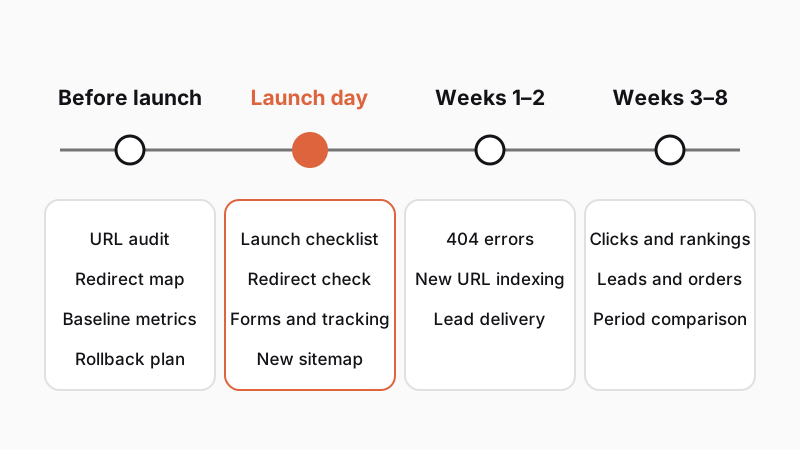
What to watch and when:
For seasonal goods and services, compare numbers against the same weeks last year, not the previous month. That way you won't confuse a seasonal swing with a site error.
Update new URLs off-site too: in your Google Business Profile, ads, social profiles, email signatures, directories, and comparison sites. Ask key partners to update their links directly to the new URL.
Step in if 404 errors climb, important pages stay unindexed after weeks, or traffic holds steady while leads fall (the issue is usually a form, tracking, or user flow). If search traffic drops more than usual, cross-check old URLs against 404 errors and inspect noindex tags, canonicals, and any lost content. For the basics, see What you can do for your company's SEO.
In November 2026, we used these exact rules to move guapmedia.cz from Webflow to a custom build and added two languages alongside Czech.
We will publish Search Console data after six to eight weeks live.
We run client website redesigns the exact same way—see the full workflow on How it works. Estimate your project scope in our project configurator, or see how we build business websites.
Not if you permanently redirect old URLs with traffic or backlinks to matching new pages and keep important content. Google notes that temporary fluctuations are normal during a site move, though. Lasting drops come mainly from missing redirects, trimmed content, or a forgotten noindex tag from testing.
Google recommends at least one year so value transfers from old URLs to new ones. Because links from other websites, directories, and emails keep pointing to old URLs, leaving redirects in place permanently pays off. It costs nothing and prevents 404 errors.
According to Google, moving most pages takes a few weeks for a small or medium site and longer for a larger one. Monitor Search Console and leads for at least eight weeks after launch, comparing matching periods—such as the same weeks last year in seasonal industries.
If your site works well overall and only a few pages underperform, update it gradually so visitors don't have to learn a new interface needlessly. A full website redesign pays off when the technology is outdated, mobile usability is poor, the structure is messy, or updates still fail to bring in leads.
Handpicked topics for you
A website can cost a few thousand or hundreds of thousands of CZK—and both make sense. See what drives the price, what three years of operation cost, and what to ask vendors.
Translating into English alone won't win foreign clients. Localization, URL structure, and hreflang decide. See what we learned launching our site in 3 languages.
Read our tips on boosting your search rankings and winning new customers for free
A new website can lose years of search traffic, usually from missed redirects. Here is how to prevent that, including lessons from our own redesign.
A website redesign doesn't have to cost you search traffic. Permanently redirect every old URL that brought visits or backlinks to its matching new page, and follow a checklist on launch day. Where website redesign and SEO clash, the culprit is usually forgotten redirects, not the new look.
Here we walk through the full process: choosing between a redesign and gradual updates, auditing before the first mockup, setting up 301 redirects, and knowing what to check on launch day and in the weeks after. We also show how we handled our own redesign in November 2026.
A full overhaul pays off only when gradual updates stop helping. In a 2015 article on radical vs. incremental redesign, consultancy Nielsen Norman Group advises against radical changes where smaller steps will do. Visitors get used to a site, and a major change forces them to relearn how to use it.
According to the authors, a full redesign makes sense when small tweaks and repeated fixes fail to lift conversions, outdated tech blocks important changes, the site structure has grown tangled, or competitors serve customers demonstrably better.
For smaller businesses, five signs stand out:
It is like a house: sometimes a coat of paint is enough; other times you have to replace old wiring and foundations. Even in a major renovation, you don't tear down walls before mapping the pipes. On a website, those pipes are URLs, links, and tracking. First, check where search visitors land, where external links point, and which pages generate leads. A redesign should keep what works and fix what doesn't.
Think carefully about how much you change at once. A new look, URLs, CMS, copy, and domain mean five changes at once. If traffic drops, you won't know why. Split big steps apart—for instance, launch the new site on your current domain first, and move to a new domain once things settle. For prices and related costs, see How much a website costs.
During a website redesign and migration, it is easy to lose hidden elements that bring search engines and customers to you:
You can prevent most of these losses by running an URL audit before the first mockup.
An audit is a spreadsheet of all your old URLs and their results. Build it from four sources, since none is complete on its own:
For each URL, log annual traffic, external link count, and whether it brings leads or orders. Then decide what happens to it: keep as is, give it a new URL, merge into another page, or retire.
| Old URL | New URL | What happens |
|---|---|---|
| /custom-kitchens.html | /custom-kitchens.html | unchanged |
| /services/built-in-wardrobes | /built-in-wardrobes | 301 redirect |
| /news/new-showroom | /about-us | merged, 301 redirect |
| /spring-promo | none | retired, 404 error |
These URLs belong to a fictional carpentry shop and illustrate the four typical cases.
The best redirect is no redirect. If a page can stay at its original URL, leave it there. Every URL change creates extra work for search engines and risks a forgotten redirect.
Guard your content the same way. When rewriting, keep the topic and the answers search visitors come for. Cutting copy in half just to fit a layout is the fastest way to lose rankings.
Check account access during the audit, too. If a former vendor manages your domain, Search Console, or analytics, sort that out beforehand using our guide Who owns your website.
A 301 redirect tells visitors and search engines a page has moved permanently. Like mail forwarding, it automatically sends visitors from the old URL to the new one, and search engines gradually transfer the original page's value there too.
According to Google's redirect documentation, codes 301 and 308 are permanent. Codes 302, 303, and 307 are temporary, meaning the old page may stay in search results. Server-side redirects are the most reliable. Treat JavaScript as a last resort—search engines may miss it.
Every old URL with traffic or backlinks should point in one step to the closest matching new page. Google's site move guide comes down to four rules:
Technical setup depends on where your site runs (server config, a CMS plugin, or a rules file; on large sites, pattern rules for whole folders). As the client, your priority is having a complete "old URL → new URL" list and testing it before launch.
Tidy up the new site too: rewrite internal links in copy and menus straight to new URLs, give every page a self-referencing canonical URL, and include only new URLs in your sitemap. On a multilingual site, update hreflang tags—more in Multilingual websites and SEO.
Launch day is about verification. Most traffic-costing mistakes happen at the last minute: a leftover noindex tag or robots.txt block from staging, broken tracking, or dead forms.
Schedule the launch early in the week when the team is at work, never Friday evening. Split roles ahead of time: who checks forms and analytics, who submits the sitemap in Search Console, who verifies redirects, and who makes the call to roll back to the old site if needed.
A rollback plan means keeping the old site ready and knowing how to restore it fast if a major issue appears.
Expect temporary ranking swings after launch. According to Google, moving a small or medium site to new URLs takes several weeks, and longer for larger sites.
What to watch and when:
For seasonal goods and services, compare numbers against the same weeks last year, not the previous month. That way you won't confuse a seasonal swing with a site error.
Update new URLs off-site too: in your Google Business Profile, ads, social profiles, email signatures, directories, and comparison sites. Ask key partners to update their links directly to the new URL.
Step in if 404 errors climb, important pages stay unindexed after weeks, or traffic holds steady while leads fall (the issue is usually a form, tracking, or user flow). If search traffic drops more than usual, cross-check old URLs against 404 errors and inspect noindex tags, canonicals, and any lost content. For the basics, see What you can do for your company's SEO.
In November 2026, we used these exact rules to move guapmedia.cz from Webflow to a custom build and added two languages alongside Czech.
We will publish Search Console data after six to eight weeks live.
We run client website redesigns the exact same way—see the full workflow on How it works. Estimate your project scope in our project configurator, or see how we build business websites.
Not if you permanently redirect old URLs with traffic or backlinks to matching new pages and keep important content. Google notes that temporary fluctuations are normal during a site move, though. Lasting drops come mainly from missing redirects, trimmed content, or a forgotten noindex tag from testing.
Google recommends at least one year so value transfers from old URLs to new ones. Because links from other websites, directories, and emails keep pointing to old URLs, leaving redirects in place permanently pays off. It costs nothing and prevents 404 errors.
According to Google, moving most pages takes a few weeks for a small or medium site and longer for a larger one. Monitor Search Console and leads for at least eight weeks after launch, comparing matching periods—such as the same weeks last year in seasonal industries.
If your site works well overall and only a few pages underperform, update it gradually so visitors don't have to learn a new interface needlessly. A full website redesign pays off when the technology is outdated, mobile usability is poor, the structure is messy, or updates still fail to bring in leads.
Handpicked topics for you
A website can cost a few thousand or hundreds of thousands of CZK—and both make sense. See what drives the price, what three years of operation cost, and what to ask vendors.
Translating into English alone won't win foreign clients. Localization, URL structure, and hreflang decide. See what we learned launching our site in 3 languages.
Read our tips on boosting your search rankings and winning new customers for free