
EU withdrawal button: what online stores must do
In Czechia, the EU withdrawal button is mandatory from January 1, 2027, not June 2026. See what the law requires and how to design it without dark patterns.
The European Accessibility Act covers online stores except microenterprises. Spot your website's weak points in 30 minutes without a developer.

Web accessibility means people with disabilities, seniors, or anyone with a temporary limitation—like an arm in a cast—can use your site. Since June 28, 2025, accessibility has been mandatory for online stores and other e-commerce services under the EU's European Accessibility Act, implemented in Czechia as Act No. 424/2023 Sb. In our reading, this accessibility law does not cover brochure websites where customers cannot place orders.
We explain who the law covers, what accessibility means in practice, and how to find your site's weak spots in 30 minutes without a developer. This article reflects the situation as of November 2026 and does not replace legal advice.
Since June 28, 2025, consumer e-commerce services must meet accessibility rules. In Czechia, this is set by Act No. 424/2023 Sb., which transposes Directive (EU) 2019/882 (the European Accessibility Act). The same rules apply across the EU.
Under Section 3 of the Czech act, an e-commerce service means a website or mobile app where a consumer concludes a contract remotely. In practice, this covers e-shops, online orders, service bookings, and ticket sales. If you also run a shopping mobile app, the rules apply to it too: it must support system font scaling, work with screen readers, and have clear button labels. The law also covers payment terminals, banking, and communications, though here we focus on websites and e-shops.
In our reading, a brochure site without orders falls outside this definition because customers do not conclude contracts on it. Once you add ordering, appointment booking, or ticket sales, the law applies to you. Public authorities and institutions in Czechia have had mandatory accessibility since 2019 under Act No. 99/2019 Sb.
Still, web accessibility pays off for everyone. People with low vision or seniors look for a contractor or an accountant just like anyone else. A readable, easy-to-navigate site helps them choose you even on a standard brochure website.
The accessibility law covers you if you sell to consumers online and are not a microenterprise. You can check in a few steps.
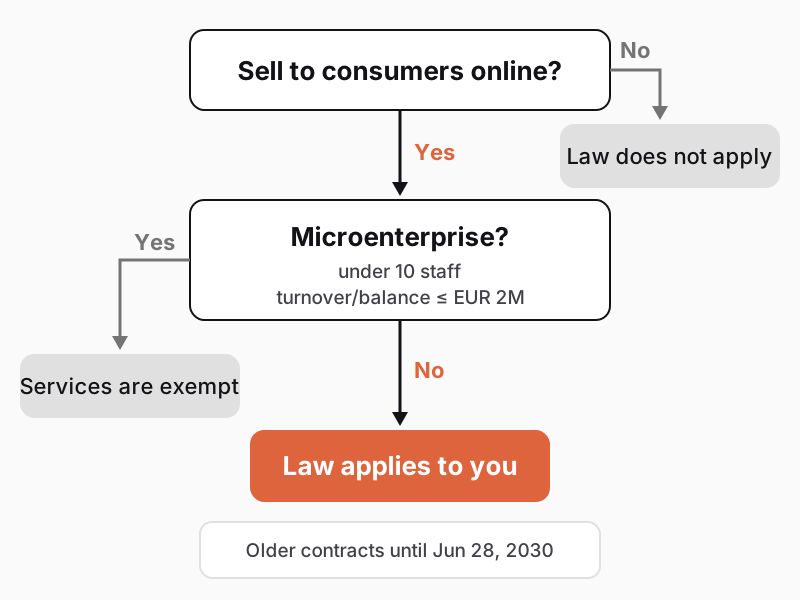
Do you sell to consumers online? The law applies to distance contracts with consumers, not pure business-to-business (B2B) sales. If both companies and consumers without a business ID buy from you, your entire consumer checkout journey must be accessible.
Are you a microenterprise? Microenterprises are exempt (Section 2(3)). According to the Czech Ministry of Industry and Trade, these are businesses with fewer than 10 employees and annual turnover or a balance sheet total up to EUR 2 million (linked and partner enterprises in a group count together).
Did you sign a customer contract before June 28, 2025? Those services can continue unchanged until the contract expires, or until June 28, 2030 at the latest (Section 28(5)). This will not help a standard e-shop, because every purchase is a new contract.
Would compliance impose a disproportionate burden? An exemption applies if changes would fundamentally alter the service or cause a disproportionate burden (Section 15). However, you must first complete a documented assessment under the annex to the act and notify the Czech Trade Inspection Authority.
Example: a fictional cosmetics e-shop has four employees and around EUR 1 million in turnover, so it is exempt as a microenterprise. Once it grows to twelve staff, the exemption ends. Build accessibility into your e-shop from day one.
Anyone can use an accessible website regardless of how they see, hear, or operate a computer. The international WCAG 2.2 guidelines rest on four principles:
This is not just about permanent disabilities. A shopper with low vision needs to enlarge text without breaking the layout. Someone with a broken arm shops using only a keyboard, while others read on a phone in bright sunlight or watch muted videos on a tram.
The law does not name a specific technical standard, but under Section 16 meeting a harmonized standard is enough. In practice, businesses use European standard EN 301 549, which adopts WCAG at Level AA. Ask your vendor for this exact level.
Accessibility also helps SEO and AI answers: image descriptions, clear headings, and descriptive links make it easier for search engines to understand your page.
What does an accessible checkout look like? Every field has a permanently visible label. Errors appear as text right next to the field (for example, "Enter a five-digit postal code"), not just as a red border. The button clearly says "Place order," checkout has no strict time limit, and bot protection does not rely solely on typing distorted letters. Clear structure helps your homepage too—read more in Website homepage.
The most common web accessibility issues are basic: low text contrast, images missing descriptions, and unlabeled form fields. This shows up in the WebAIM Million, an annual automated scan of the homepages of the world's top one million websites. The 2026 edition, using February 2026 data, found automatically detectable WCAG 2 errors on 95.9% of pages, averaging 56.1 errors per page.
| Issue | Prevalence (WebAIM 2026) | Impact | How to fix it |
|---|---|---|---|
| Low text contrast | 83.9% | Hard-to-read text, especially in sunlight | Raise contrast to at least 4.5:1 |
| Missing image alt text | 53.1% | Screen reader cannot describe the image | Add alt text, or leave empty if decorative |
| Unlabeled form field | 51% | Blind users do not know what to enter | Add a visible label to every field |
| Empty link | 46.3% | Icon link has no accessible name | Add link text or a hidden label |
| Empty button | 30.6% | Icon button (e.g., search) has no name | Add an accessible button name |
| Missing page language | 13.5% | Screen reader uses the wrong pronunciation | Set the language attribute in code |
We see the exact same issues on Czech websites: light gray text on white backgrounds, unnamed cart and search icons, or form labels that vanish on click. You can fix all of these without rebuilding your site, often within days.
Light brand colors on white backgrounds often fail contrast checks on small text and buttons. Use a darker shade for text and buttons, and save the light brand color for larger surfaces.
Automated tools cannot tell whether image alt text or an error message actually helps, or whether a buyer can check out by keyboard. Test that manually on one page of each template type (homepage, category, product detail, cart, checkout, contact)—fixing one template fixes every page that uses it.
Your content editor can add photo descriptions, rewrite vague "read more" links into specific text (such as "Shipping rates"), and break up copy with headings. A developer handles templates, contrast, and keyboard navigation. Follow the same rules whenever you upload new photos and banners.
In 30 minutes, you can find your website's weakest spots—without a developer or paid tools. This test is based on W3C's Easy Checks. Focus on your purchase path: product search, product page, cart, and checkout.
Write down what fails and where. Fix purchase-blocking issues first, like a checkout that traps keyboard users. This check does not replace a professional audit, but it gives you a concrete brief for your vendor. Repeat it after major updates and once a quarter.
Try adding a product to the cart using a screen reader too (Narrator on Windows, VoiceOver on Mac and iPhone, TalkBack on Android), or ask a colleague or someone who uses a screen reader daily to test it.
In Czechia, the Czech Trade Inspection Authority enforces the accessibility law for e-shops (Section 19(2)). Under Section 25, serious violations—where a service fails accessibility requirements or ignores an ordered remedy—carry fines up to CZK 10 million. Minor violations, such as failing to publish accessibility information, carry fines up to CZK 1 million.
In your terms and conditions or a similar document, you must maintain an accessible statement explaining how your service meets the requirements (Section 14): which standard you tested against (e.g., WCAG 2.2 Level AA), what does not yet comply, when you will fix it, and where users can report issues.
What to do next:
At checkout, e-shop accessibility directly affects revenue—see Abandoned cart in e-commerce. Starting January 1, 2027, EU consumer rules also introduce a mandatory contract withdrawal button, and its form must be accessible too.
When building e-shops, we design for accessibility from the start because retrofitting costs more. If you want to review your e-shop's accessibility with us and get a prioritized fix list based on checkout impact, get in touch.
The accessibility law exempts services provided by microenterprises (fewer than 10 employees and turnover or balance sheet total up to EUR 2 million). Larger businesses selling to consumers online must comply; in our view, brochure sites without ordering do not.
Under Commission Recommendation and Regulation (EU) No 651/2014, a microenterprise has fewer than 10 staff and annual turnover or a balance sheet total up to EUR 2 million, including linked and partner companies. This exemption covers e-shops.
In Czechia, under Section 25 of Act No. 424/2023 Sb., the Czech Trade Inspection Authority can fine businesses up to CZK 10 million for non-compliance or ignoring corrective orders, and up to CZK 1 million for missing accessibility information.
No—an overlay widget cannot fix unlabeled form fields, unnamed buttons, or a checkout that blocks keyboard users. Screen reader users already have their own settings, so widgets at best supplement real code fixes, never replace them.
Run a 30-minute check: shop using only your keyboard, zoom to 200%, check contrast, alt text, and form labels, and run Lighthouse or WAVE. Automated tools catch only part of the issues, so we recommend a manual audit too.
Handpicked topics for you
In Czechia, the EU withdrawal button is mandatory from January 1, 2027, not June 2026. See what the law requires and how to design it without dark patterns.
Visitors form a first impression before reading a word and decide within seconds whether to stay. Here is what must be clear at the top and how to test it in an afternoon.
Seven in ten carts end without an order. Some shoppers just compare prices, while shipping costs, forced accounts, or missing parcel lockers stop others. Here is what to fix.
The European Accessibility Act covers online stores except microenterprises. Spot your website's weak points in 30 minutes without a developer.
Web accessibility means people with disabilities, seniors, or anyone with a temporary limitation—like an arm in a cast—can use your site. Since June 28, 2025, accessibility has been mandatory for online stores and other e-commerce services under the EU's European Accessibility Act, implemented in Czechia as Act No. 424/2023 Sb. In our reading, this accessibility law does not cover brochure websites where customers cannot place orders.
We explain who the law covers, what accessibility means in practice, and how to find your site's weak spots in 30 minutes without a developer. This article reflects the situation as of November 2026 and does not replace legal advice.
Since June 28, 2025, consumer e-commerce services must meet accessibility rules. In Czechia, this is set by Act No. 424/2023 Sb., which transposes Directive (EU) 2019/882 (the European Accessibility Act). The same rules apply across the EU.
Under Section 3 of the Czech act, an e-commerce service means a website or mobile app where a consumer concludes a contract remotely. In practice, this covers e-shops, online orders, service bookings, and ticket sales. If you also run a shopping mobile app, the rules apply to it too: it must support system font scaling, work with screen readers, and have clear button labels. The law also covers payment terminals, banking, and communications, though here we focus on websites and e-shops.
In our reading, a brochure site without orders falls outside this definition because customers do not conclude contracts on it. Once you add ordering, appointment booking, or ticket sales, the law applies to you. Public authorities and institutions in Czechia have had mandatory accessibility since 2019 under Act No. 99/2019 Sb.
Still, web accessibility pays off for everyone. People with low vision or seniors look for a contractor or an accountant just like anyone else. A readable, easy-to-navigate site helps them choose you even on a standard brochure website.
The accessibility law covers you if you sell to consumers online and are not a microenterprise. You can check in a few steps.
Do you sell to consumers online? The law applies to distance contracts with consumers, not pure business-to-business (B2B) sales. If both companies and consumers without a business ID buy from you, your entire consumer checkout journey must be accessible.
Are you a microenterprise? Microenterprises are exempt (Section 2(3)). According to the Czech Ministry of Industry and Trade, these are businesses with fewer than 10 employees and annual turnover or a balance sheet total up to EUR 2 million (linked and partner enterprises in a group count together).
Did you sign a customer contract before June 28, 2025? Those services can continue unchanged until the contract expires, or until June 28, 2030 at the latest (Section 28(5)). This will not help a standard e-shop, because every purchase is a new contract.
Would compliance impose a disproportionate burden? An exemption applies if changes would fundamentally alter the service or cause a disproportionate burden (Section 15). However, you must first complete a documented assessment under the annex to the act and notify the Czech Trade Inspection Authority.
Example: a fictional cosmetics e-shop has four employees and around EUR 1 million in turnover, so it is exempt as a microenterprise. Once it grows to twelve staff, the exemption ends. Build accessibility into your e-shop from day one.
Anyone can use an accessible website regardless of how they see, hear, or operate a computer. The international WCAG 2.2 guidelines rest on four principles:
This is not just about permanent disabilities. A shopper with low vision needs to enlarge text without breaking the layout. Someone with a broken arm shops using only a keyboard, while others read on a phone in bright sunlight or watch muted videos on a tram.
The law does not name a specific technical standard, but under Section 16 meeting a harmonized standard is enough. In practice, businesses use European standard EN 301 549, which adopts WCAG at Level AA. Ask your vendor for this exact level.
Accessibility also helps SEO and AI answers: image descriptions, clear headings, and descriptive links make it easier for search engines to understand your page.
What does an accessible checkout look like? Every field has a permanently visible label. Errors appear as text right next to the field (for example, "Enter a five-digit postal code"), not just as a red border. The button clearly says "Place order," checkout has no strict time limit, and bot protection does not rely solely on typing distorted letters. Clear structure helps your homepage too—read more in Website homepage.
The most common web accessibility issues are basic: low text contrast, images missing descriptions, and unlabeled form fields. This shows up in the WebAIM Million, an annual automated scan of the homepages of the world's top one million websites. The 2026 edition, using February 2026 data, found automatically detectable WCAG 2 errors on 95.9% of pages, averaging 56.1 errors per page.
| Issue | Prevalence (WebAIM 2026) | Impact | How to fix it |
|---|---|---|---|
| Low text contrast | 83.9% | Hard-to-read text, especially in sunlight | Raise contrast to at least 4.5:1 |
| Missing image alt text | 53.1% | Screen reader cannot describe the image | Add alt text, or leave empty if decorative |
| Unlabeled form field | 51% | Blind users do not know what to enter | Add a visible label to every field |
| Empty link | 46.3% | Icon link has no accessible name | Add link text or a hidden label |
| Empty button | 30.6% | Icon button (e.g., search) has no name | Add an accessible button name |
| Missing page language | 13.5% | Screen reader uses the wrong pronunciation | Set the language attribute in code |
We see the exact same issues on Czech websites: light gray text on white backgrounds, unnamed cart and search icons, or form labels that vanish on click. You can fix all of these without rebuilding your site, often within days.
Light brand colors on white backgrounds often fail contrast checks on small text and buttons. Use a darker shade for text and buttons, and save the light brand color for larger surfaces.
Automated tools cannot tell whether image alt text or an error message actually helps, or whether a buyer can check out by keyboard. Test that manually on one page of each template type (homepage, category, product detail, cart, checkout, contact)—fixing one template fixes every page that uses it.
Your content editor can add photo descriptions, rewrite vague "read more" links into specific text (such as "Shipping rates"), and break up copy with headings. A developer handles templates, contrast, and keyboard navigation. Follow the same rules whenever you upload new photos and banners.
In 30 minutes, you can find your website's weakest spots—without a developer or paid tools. This test is based on W3C's Easy Checks. Focus on your purchase path: product search, product page, cart, and checkout.
Write down what fails and where. Fix purchase-blocking issues first, like a checkout that traps keyboard users. This check does not replace a professional audit, but it gives you a concrete brief for your vendor. Repeat it after major updates and once a quarter.
Try adding a product to the cart using a screen reader too (Narrator on Windows, VoiceOver on Mac and iPhone, TalkBack on Android), or ask a colleague or someone who uses a screen reader daily to test it.
In Czechia, the Czech Trade Inspection Authority enforces the accessibility law for e-shops (Section 19(2)). Under Section 25, serious violations—where a service fails accessibility requirements or ignores an ordered remedy—carry fines up to CZK 10 million. Minor violations, such as failing to publish accessibility information, carry fines up to CZK 1 million.
In your terms and conditions or a similar document, you must maintain an accessible statement explaining how your service meets the requirements (Section 14): which standard you tested against (e.g., WCAG 2.2 Level AA), what does not yet comply, when you will fix it, and where users can report issues.
What to do next:
At checkout, e-shop accessibility directly affects revenue—see Abandoned cart in e-commerce. Starting January 1, 2027, EU consumer rules also introduce a mandatory contract withdrawal button, and its form must be accessible too.
When building e-shops, we design for accessibility from the start because retrofitting costs more. If you want to review your e-shop's accessibility with us and get a prioritized fix list based on checkout impact, get in touch.
The accessibility law exempts services provided by microenterprises (fewer than 10 employees and turnover or balance sheet total up to EUR 2 million). Larger businesses selling to consumers online must comply; in our view, brochure sites without ordering do not.
Under Commission Recommendation and Regulation (EU) No 651/2014, a microenterprise has fewer than 10 staff and annual turnover or a balance sheet total up to EUR 2 million, including linked and partner companies. This exemption covers e-shops.
In Czechia, under Section 25 of Act No. 424/2023 Sb., the Czech Trade Inspection Authority can fine businesses up to CZK 10 million for non-compliance or ignoring corrective orders, and up to CZK 1 million for missing accessibility information.
No—an overlay widget cannot fix unlabeled form fields, unnamed buttons, or a checkout that blocks keyboard users. Screen reader users already have their own settings, so widgets at best supplement real code fixes, never replace them.
Run a 30-minute check: shop using only your keyboard, zoom to 200%, check contrast, alt text, and form labels, and run Lighthouse or WAVE. Automated tools catch only part of the issues, so we recommend a manual audit too.
Handpicked topics for you
In Czechia, the EU withdrawal button is mandatory from January 1, 2027, not June 2026. See what the law requires and how to design it without dark patterns.
Visitors form a first impression before reading a word and decide within seconds whether to stay. Here is what must be clear at the top and how to test it in an afternoon.
Seven in ten carts end without an order. Some shoppers just compare prices, while shipping costs, forced accounts, or missing parcel lockers stop others. Here is what to fix.